For some time now we have had the option to deactivate news in the widgets under Windows in the settings. This means that only the widgets are displayed. Microsoft is currently testing a new variant with a left menu bar for switching.
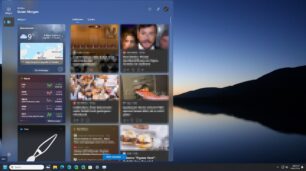
The Web Experience Pack 524.1301.320.0, 410.0 or 460.0 is currently required so that it can be displayed. On the left you have the switch between “My Feed” and “Widgets”. This eliminates the need to hide the news if you don't want it and you can still quickly look at the feeds if necessary.
This is all still being tested and the display sometimes stops, so you have to shoot the widgets in the task manager. But this new menu bar isn't so bad. Let's see whether Microsoft will adopt this variant for everyone later.
In case you're curious. I tried it once in Windows 11 23H2. The Web Experience Pack is necessary, as described above. You can find this here
- store.rg-adguard.net
- From left to right ProductId | 9MSSGKG348SP | Almost | Press hook
- After installation, download the ViVeTool and unzip it. Right-click in the folder, open Terminal and enter the command:
- For Web Experience Pack 524.1301.460.0 .vivetool /enable /id:49668668
- For Web Experience Pack 524.1301.410.0 and below .vivetool /enable /id:47370305
If you want to undo it, swap enable for disable in the command.