(Original April 1, 2024): Microsoft has switched many things in Windows 11 to XAML. This includes the taskbar, the Task Manager, File Explorer and the Start menu. The advantage for the (desk) modders is that you can change a lot using the Windhawk mods. This also means “freeing” the start menu from some things.
With the Mod Windows 11 Start Menu Styler it is possible, for example, to remove the search in the start menu, the Recommended section and more. I tried it once in the current beta. The day before yesterday I presented to you the currently hidden option to display “All Apps” differently. But back to the Start Menu Styler.
All you need is Windhawk. Installed or portable, can be selected in the installer. After starting, look for the “Windows 11 Start Menu Styler” mod and install it. If you call this up, you can make the changes via the settings.
It has already been noted that the round corners need to be removed. If you like this, you can remove the entry and save the setting. The change is then immediately visible when you open the start menu. For the most important options there is a “Styling guide” on GitHub. Here are two options:
Remove search box in start menu:
- Under Control styles -> Add new item
- Target
StartDocked.SearchBoxToggleButton - Styles
Height=0, Margin=0,0,0,24
That's it here.
Hide the Recommended section in the Start menu
Now again under Control styles, not directly under Styles “Add new element”
- Target
Windows.UI.Xaml.Controls.Grid#ShowMoreSuggestions - Styles Visibility=Collapsed
- Add new element:
- Target
Windows.UI.Xaml.Controls.Grid#SuggestionsParentContainer - Styles Visibility=Collapsed
- Add new element:
- Target
Windows.UI.Xaml.Controls.Grid#TopLevelSuggestionsListHeader - Styles Visibility=Collapsed
Many other settings are also possible. For example, changing the curves. Use “Margin” to place entries differently and more. (Might sound familiar to Rainmeter users). But I'll leave these experiments to you. As a PS, there is also a “Windows 11 Taskbar Styler” as a mod for Windhawk that works similarly.
[Update 21.04.2024]: 4 themes are now available for the mod
After the Windows 11 Start Menu Styler Mod for Windhawk was well received, there was an update yesterday. Well actually two. Because in version 1.1.1 a small error was corrected. What's new is that the mod now has integrated themes that you can select.
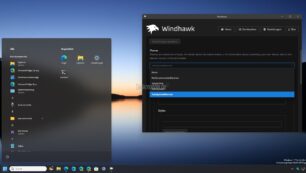
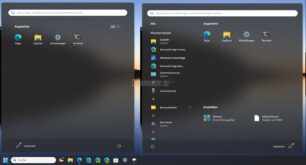
This makes it possible to hide the recommended section using NoRecommendedSection. Or, for example, a view on the left with all apps using SideBySideMinimal. On the right with the pinned apps and without setting the Recommended section. Of course, you can still tinker with the styles yourself.
Info and download:
- Windhawk must start with Windows for the changes to apply.
- If you remove the mod or Windhawk, everything is back to normal.
- windhawk.net