With a Microsoft account, the paired devices are displayed on the website. The Xbox, Surface or any Windows 10 or Windows 11 installation on the PC can appear here. Interesting for a new installation if you can then select the respective device for activation here.
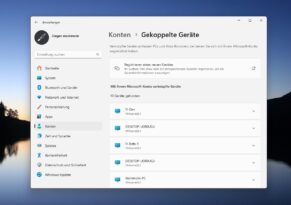
Exactly these devices are now also displayed in the settings. This will then be visible under Settings -> Accounts -> Paired Devices. Phantom tweeted the Vive IDs for the Windows 11 Beta yesterday. So I checked in advance to see what it looked like so far and I realized that Microsoft had already given me this setting. All entries for accounts will then be visible under Accounts -> Accounts.
The prerequisite is probably KB5036980 as an optional April update. In the beta I then executed the command and then had this new setting without restarting. This means that the command should not only be valid for the beta, but also with KB5036980 installed.
And so it goes:
- Download and unzip ViveTool.
- In the folder, right-click “Open in Terminal (Admin)
- And the command
.vivetool /enable /id:47448915,48546544carry out - If you now open the settings, you will see the paired devices that are displayed there from the Microsoft website.
- If it is not yet visible, just restart.