Yesterday, KB5034848 was initially released in the release preview channel. This update includes the changes that will come to everyone as a Moment5 update at the end of February or with Patchday March.
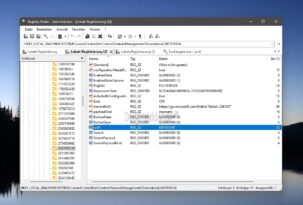
What's interesting is that Microsoft is handling the Moment updates differently this time than usual. While various entries were previously written to the registry for this purpose (see Moment4 Update), Microsoft is now using KB5035349 as a CFR update (Controlled Feature Rollout).
This means that instead of writing the many momentary entries in the registry, two entries are written that would otherwise be integrated when a new function is activated. Or through the ViveTool with the associated command.
The entry can be found after installing KB5035349 under
HKEY_LOCAL_MACHINESYSTEMCurrentControlSetControlFeatureManagementOverrides42807018124
and
HKEY_LOCAL_MACHINESYSTEMControlSet001ControlFeatureManagementOverrides42807018124
This will then unlock the new features.
The Moment5 update is the last of its kind with which Microsoft repeatedly distributed new functions. Now they have switched back to the 1-year updates, starting with Windows 11 24H2 in the fall for everyone. The 24H2 reaches “RTM” status much earlier so that device manufacturers can start delivering new devices from June.
If you are currently in the RP channel and are looking for the installed KB5035349, you can find it in the update history under “More updates”. Here's another video from Phantom about what awaits you with the Windows 11 Moment5 update.