Last week, all insiders had to take a break. The reason was the holiday in the USA. But after yesterday's patch day, things are now continuing with a new Windows 11 24H2 26252.5000, more precisely the 10.0.26252.5000 ge_prerelease from July 5, 2024 as a Canary version.
We will of course collect the ISOs as usual and then provide the link here and in the right sidebar. Last time there was the problem that Windows Update remained empty after a new installation. But the updates are still downloaded. Schorsch created a workaround for this.
- Lock screen: We're starting with this build in the Canary channel by bringing weather and more to your lock screen. Maps have been improved in design with acrylic blur, map size, spacing, and font optimization. To enable this feature, go to Settings > Personalization > Lock screen.
- Start menu You can now also pin applications from the Start menu to the taskbar by dragging and dropping items from the pinned area of the Start menu directly onto the taskbar. We've already reported on this.
- Settings: Evaluation copy expiration date information is now visible under Settings > System > About.
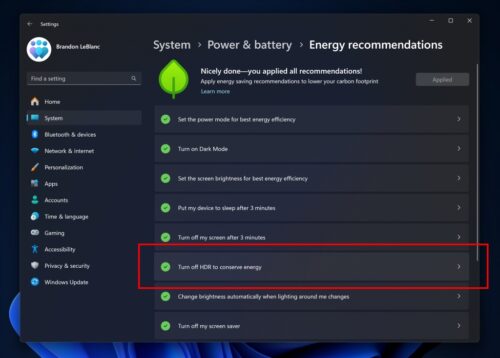
- We're starting by introducing a new power recommendation to disable HDR to save power on PCs with HDR displays, under Settings > Power & battery > Power recommendations.
Known issues in Windows 11 26252
- [WICHTIGER HINWEIS] We are investigating reports that some Windows Insiders in the Canary Channel and the Development Channel are stuck on Build 26040 or Build 23620. The investigation is ongoing.
Fixes and improvements in Windows 11 26252
- Input:
- Fixed an issue that caused Insiders to experience errors when attempting to use voice typing with certain languages, such as Chinese.
- Fixed an issue where Pinyin unexpectedly appeared twice in the list of available input methods when going through Windows Setup (OOBE).
- Task Manager Fixed an issue where colors in the Performance section were not displayed correctly in Dark Mode.
- Settings:
- Fixed an issue that caused icons in Settings > Apps > Startup to be much too large for the available space for some users, causing them to be cut off.
- Fixed an issue where Settings > System > Power & battery unexpectedly contained duplicate text when displaying a slow charger warning.
- Fixed an issue where the Windows Update page in Settings was not displayed correctly (no text was displayed) for some Insiders after the last build. If you are affected, updating to this build with the fix should still happen automatically, but you may have to wait a little longer.
- blogs.windows