This weekend, Microsoft is making a new Insider build available in the Canary channel. This week it is Windows 11 26244.5000, or more precisely 10.0.26244.5000 ge_prerelease. First of all: some people are having problems with the “Windows Insider” settings. Microsoft will correct this on the server side. But back to today’s Insider Build.
We will of course collect the ISOs as usual and then provide the link here and also in the right sidebar.
Known issues in Windows 11 26244
- [WICHTIGER HINWEIS] We are investigating reports that some Windows Insiders in the Canary and Dev channels are stuck on build 26040 or build 23620. The investigation is ongoing. If you are affected and are keen to upgrade to the latest build in the Canary or Dev channels today, you can download the latest ISO file
- WindowsUpdate [NEU] We're investigating reports that the Windows Update page in Settings isn't displaying correctly (no text is displayed) for Insiders using certain languages after the latest build. If you're affected, the update should still happen on its own, but you may have to wait a bit.
- Task Manager We're working on fixing an issue where colors in the Performance section aren't displaying correctly in Dark Mode.
- Voice input [NEU] We're working on fixing an issue where Insiders are seeing errors when trying to use voice typing with certain languages, like Chinese.
Fixes and improvements in Windows 11 26244
- This update includes a small set of general improvements and fixes that improve the overall experience for Insiders running this build on their PCs.
- Windows Backup If you have both Personalization and other Windows settings enabled under Settings > Accounts > Windows Backup, many of your sound settings (including your chosen sound scheme) will be backed up and can be restored using the Windows Backup app.
- Settings:
- To make sure you don't lose access to your Microsoft account, you'll now see a new banner under Settings > Account with an “Add now” button that lets you add a recovery email address if you haven't already added one for your Microsoft account. This will only appear if you're signed in with a Microsoft account.
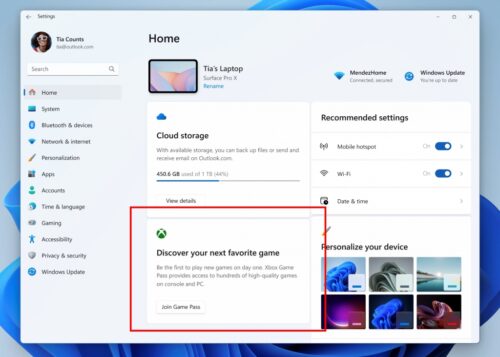
- We're introducing a new Game Pass recommendations card on the Settings home screen. You'll see the Game Pass recommendations card on the Settings home screen when you're actively playing games on your PC. As a reminder, the Settings home screen will only appear in Home and Pro editions of Windows 11 and when you're signed in to Windows with your Microsoft account.
- We're starting to roll out a change that redirects links for the Fonts panel page to the Fonts settings page in Settings > Personalization > Fonts. Insiders who see this change will still be able to access the Fonts panel page by navigating to the System Fonts folder in File Explorer; a link to the System Fonts folder will also be provided on the Fonts settings page.
- Miscellaneous Fixed an underlying issue that caused some Insiders to encounter a Pcasvc.dll error dialog with the message “Missing entry: PcaWallpaperAppDetect” after upgrading from Windows 11 version 22H2/23H2 to a 26xxx build.
- blogs.windows