Even though Apple is an innovative company and makes reliable operating systems, this does not mean that they are convenient for everyone.Many users were not satisfied for a long time standard player in iOS and iPadOS, but in 2022 the Cupertians updated it, making it much more convenient than it was – we wrote about it in detail.But if iPhone owners have no complaints about the video player, then iPad owners have at least one – it simply does not exist in Safari!Why, one wonders, was it updated?
The standard player on the iPad does not work?That’s why it’s happening
ПОДПИСЫВАЙСЯ НА НАШ КАНАЛ В ДЗЕНЕ ПРЯМО СЕЙЧАС
Like it or not, iPadOS 16 and iOS 16 are still twin brothers.However, iPhone owners can watch videos in safari browser using the standard system player, while on the iPad, in most cases, the one that is built into the site by default is now used.It may be convenient on a full-fledged PC or laptop, but for iPadOS 16 users, it’s a real disaster.Now I’ll tell you what’s the matter.
How to watch videos in Safari
I got an iPad Air 2020 last year and immediately found that videos in Safari play in third party player, which is embedded in the website by default.At first I thought that there was a switch somewhere in the system, but in the end I never found it.And later it turned out that in 99% of cases the system player does not work at all: the fact is that in iPadOS 16, Apple for some reason gave users the opportunity to use third-party players.

This is what the player looks like from the website now
The buttons of a third-party player are superimposed on the keys from iPadOS and overlap the top status bar with the date and clock.I’m generally silent about the rewind line – it either reacts to pressing, or it remains motionless.And by clicking in the middle of the screen, where the iPhone only has a pause button, the video immediately pauses.It is clear that standard player in iOS is also not perfect, but at least it is customary to use it and it looks very neat.And now what i can do?
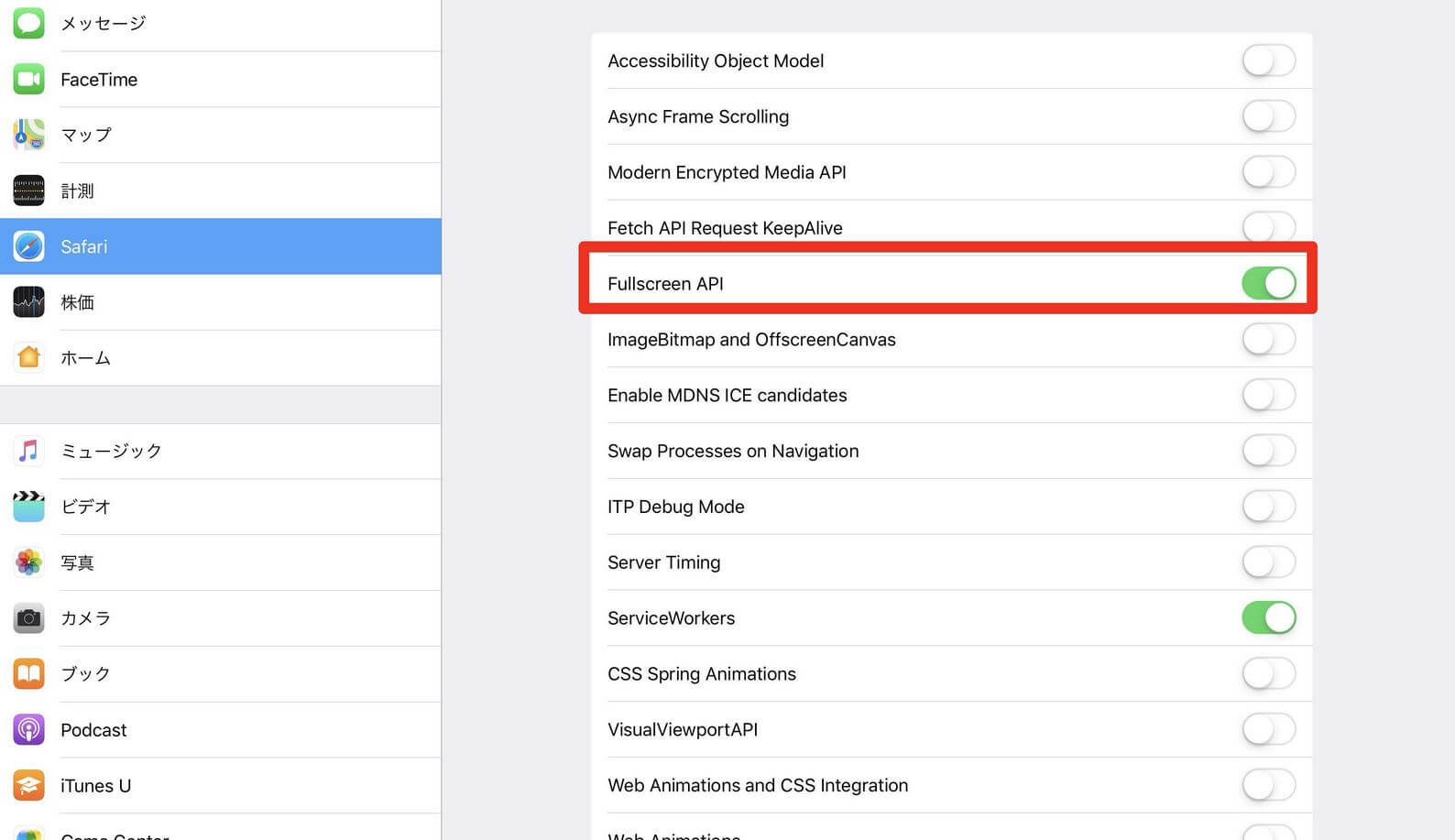
This feature is no longer available in iPadOS.
It turns out that before the release of iPadOS 16, users had the opportunity to return the system player in just a couple of clicks.Surely you saw that in the Safari settings there is an item “Experimental Features”, in which you could turn off the “Fullscreen API” setting, which was just responsible for using system player in iPadOS.However, for unknown reasons, Apple removed it in the latest version of the operating system, so you will have to watch movies in Safari through a third-party player.But there is a solution.
Какой файловый менеджер скачать на Айпад
How to return the old player in iPadOS 16
I’ve searched the forums for opportunities. return the old player on the ipad: unfortunately, it is not.The best way is not to update iPadOS on your tablet if you have the option.But there is another option, however, you will have to abandon Safari in favor of another browser.

System player not working in Safari on iPad, but available in Microsoft Edge and Chrome
It turned out that system player iPadOS 16 works in Google Chrome, Firefox and Safari, but only in full screen mode.If you start the movie, but do not deploy it, the player will remain the same.But when the video is turned on in full screen, you will see all the control buttons of the old player!But there is a minus: in the same Chrome, ad blockers will not work, so for using the standard player you will have to suffer a little by watching ads.
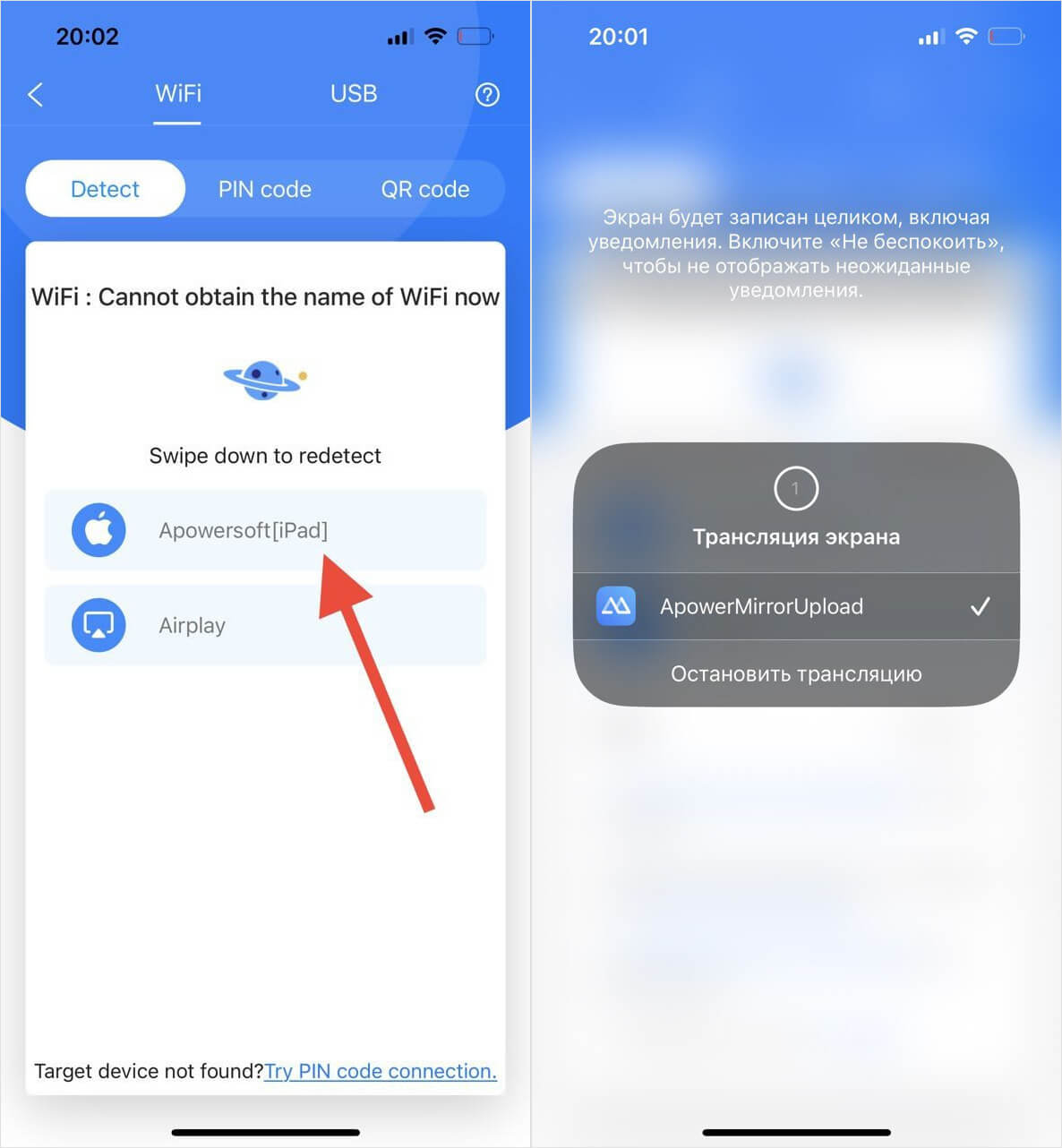
Can you mirror your iPhone screen on your iPad?
Another way – cast iPhone screen to iPad.True, using the Screen Repeat function for this will not work – it is only suitable for TVs and monitors with AirPlay.Can download ApowerMirror on both devices and run them.
- Log in to the app on your iPhone and click the LocalCast button.
- Your iPad must be signed in to ApowerMirror to discover the device.
- The system will then find your tablet and connect to it.
- If this method doesn’t work, just select the “QR Code” tab on the iPhone, and on the iPad, click “My QR Code” and scan it.
The method is so-so: the broadcast freezes, is displayed in low quality, so it’s easier to use a different browser than mirroring.
In any case, disabling a convenient player in Safari on the iPad is another spit in the direction of tablet owners. AppleInsider.ru journalist Ivan Kuznetsov not so long ago told that Apple itself does not know what to do with the iPad – be sure to read to make sure of this.