Google Company published web browser release Chrome 123. Simultaneously available stable release of a free project Chromium, which serves as the basis of Chrome. Chrome browser is different from Chromium using Google logos, the presence of a system for sending notifications in case of a crash, modules for playing copy-protected video content (DRM), a system for automatically installing updates, permanently enabling Sandbox isolation, supplying keys to the Google API and transmitting RLZ parameters when searching. For those who need more time to update, the Extended Stable branch is separately supported, followed by 8 weeks. The next release of Chrome 124 is scheduled for April 16th.
- The page displayed when opening a new tab offers a new section that displays links from tabs recently opened on other devices linked to the same Google account.
- Added support for encoding content using the Zstandard (zstd) compression algorithm, in addition to the previously supported gzip, brotli and deflate algorithms.
- Removed implementation of free video codec Theoracreated by the Xiph.org Foundation based on the codec VP3 and supported in Firefox and Chrome since 2009, but not supported in Chrome for Android and WebKit-based browsers such as Safari. The reason cited for discontinuing Theora support is concerns that implementation Theora, which has fairly complex logic for parsing binary data and decoding streams, may have vulnerabilities similar to the recent critical problems with the VP8 encoder. According to the developers, due to the increasing frequency of 0-day attacks on media codecs, security risks exceed the level of demand for the Theora codec, which is almost never used in practice, but remains a significant target for potential attacks.
- The percentage of users for whom support for third-party cookies is disabled when accessing sites other than the domain of the current page has continued to gradually increase. Such Cookies are used to track user movements between sites in the code of advertising networks, social network widgets and web analytics systems. Changes are being promoted through the initiative Privacy Sandbox, aimed at achieving a compromise between users' need to maintain privacy and the desire of advertising networks and sites to track visitors' preferences. They plan to gradually expand the disabling of third-party cookies and reach 100% in the 3rd quarter of 2024. To disable it without waiting for external changes, the “chrome://flags/#test-third-party-cookie-phaseout” setting is provided.
- For a small percentage of US users, support is enabled for machine learning-enabled features such as the smart tab grouping mode, theme generator, and interactive assistant announced in the Chrome 121 release announcement. For systems with centralized configuration management, administrators can enable AI tools on policy level, without the need to enable experimental mode.
- The service for synchronizing settings, history and bookmarks (Chrome Sync) has stopped supporting releases prior to Chrome 82.
- When you enable enhanced browser protection (Safe Browsing > Enhanced protection), information is sent to Google with information about sites displaying requests for advanced permissions (such pages are checked against an external database of malicious content and, if crossed, a warning is immediately shown to the user). Also included is sending telemetry about user cancellation of warnings shown before opening pages blacklisted by Google.
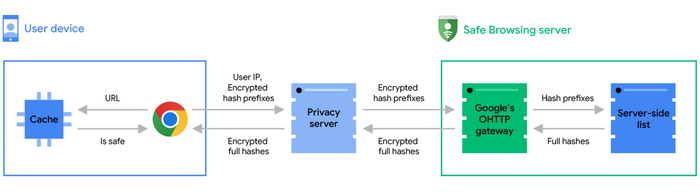
- Google published article explaining the methods Google uses to verify that the pages a user opens are safe. To maintain confidentiality, when checking URLs opened by the user, not full hashes of the URL are transmitted to Google, but only a prefix with the first 4 bytes of the hash. On the server, this prefix is checked in the database of malicious pages and, if there is a match, the list of full hashes corresponding to the prefix is returned to the user’s browser, on whose side the final comparison with the full 32-byte URL hash is already carried out. To avoid matching the request with the user's IP address, the hash prefix is first sent to an intermediate proxy, which, on its own behalf, transmits the request to the Safe Browsing system server.
- Implemented displaying warnings in the web developer tools console when a page sends a request to the internal network (192.168.xx, 10.xxx, etc.), if such requests are made outside a secure context and have not been proactively checked. Before actually sending a site-initiated request to a resource on the internal network, the browser will first send a proactive test request and will check, whether the server returned the HTTP header “Access-Control-Allow-Private-Network: true”, allowing access to the intranet network. If access is not allowed, there is an attempt to access an internal service inappropriately, which may be evidence of an attempt to carry out an attack through a browser on resources on the local network (for example, an attacker can insert into an iframe a request to the web interface of a home router, such as “iframe href=” In the release of Chrome 130, they plan to replace the warning with an error message and blocking of unsuccessful requests.
- Chrome for Android and iOS has added the ability to continue viewing sites previously opened on other devices connected to the same Google account.
- Chrome for Android has changed the way it stores local passwords so they don't sync across devices. Previously, local passwords were stored in the Chrome profile, but will now be moved to the password storage provided by Google Play services, which is already used to store the password for the Google account. In Chrome 123, the new storage mode is enabled for users without local passwords, and in Chrome 124 it will be applied to users with local passwords.
- Added API for static routing of ServiceWorkers (Service Worker Static Routing), which allows you to eliminate the execution of JavaScript and interceptions by ServiceWorkers when requesting resources that meet specified conditions. In other words, the API allows you to determine how certain resources should be loaded and disable the ServiceWorker call for resources that can be retrieved from the cache or loaded directly. URL patterns, request methods, content type (document, embed, font, video, etc.) and execution status (“running”, “not-running”) can be used as criteria for making a decision. For example, to send a post request with web form data directly, without calling the ServiceWorker, you can specify:
addEventListener('install', (event) => { event.addRoutes({ condition: { urlPattern: "/form/*", requestMethod: "post" }, source: "network" }); }); - A new light-dark() function has been added to CSS to adapt the color scheme to light or dark mode settings – the function can specify two values that will be selected depending on the light or dark mode. For example “background-color: light-dark(lime, green);”.
- Added API Long Animation Frames to diagnose the responsiveness of the site interface and identify bottlenecks during rendering.
- In media query”display-mode” added support for the “picture-in-picture” value, which allows you to create CSS rules that are applicable only when displaying a web application in picture-in-picture mode.
@media all and (display-mode: picture-in-picture) { body { margin: 0; } h1 { font-size: 0.8em; } } - In the CSS property “align-content“The ability to work with block containers and table cells has been implemented. For example, “display: block”, “display: list-item”, “display: table-cell” can now be aligned using “align-content”.
- Added the CSS property “field-sizing”, which allows you to make the size of form elements dependent on their content, for example, to automatically increase the size of a text field as you enter data.
- The navigation.activation parameter has been added to the NavigationActivation JavaScript interface, which reflects the activation state of the document (for example, you can determine that the document has been restored from the cache after clicking the forward or back navigation buttons). The parameter can be used to customize the content of the page depending on where the user arrived at it, for example, a different animation can be shown if the user comes to the home page.
- Submitted improvements to tools for web developers.

In addition to innovations and bug fixes, the new version eliminates 12 vulnerabilities. Many of the vulnerabilities were identified as a result of automated testing with tools AddressSanitizer, MemorySanitizer, Control Flow Integrity, LibFuzzer And AFL. No critical problems have been identified that would allow one to bypass all levels of browser protection and execute code on the system outside the sandbox environment. As part of the program to pay cash rewards for discovering vulnerabilities for the current release, Google paid 7 awards in the amount of 22 thousand US dollars (one award of $10,000, $4,000, $3,000 and $1,000, and two awards of $2,000). The size of one reward has not yet been determined.
Thanks for reading: