Qt Company published framework release Qt 6.7in which work continues to stabilize and increase the functionality of the Qt 6 branch. In Qt 6.7 provided platform support Windows 10+, macOS 12+, Linux (Ubuntu 22.04, openSUSE 15.5, SUSE 15 SP5, RHEL 8.8/9.2, Debian 11.6), iOS 16+, Android 8+ (API 23+), webOS, WebAssembly, INTEGRITY, VxWorks, FreeRTOS and QNX. Thanks for reading codes for Qt components supplied licensed under LGPLv3 and GPLv2.
- Improved support for using code that uses elements of the C++20 standard. Added Qt::{strong,weak,partial}_ordering classes with implementation of std::*_ordering types compatible with the C++17 specification, as well as macros that expand into the three-way comparison operator “” when compiled by compilers that support C++ 20 (if the compiler only supports C++17, macros fall back to using regular operators).
Provided the ability to use a class template std::span to represent a contiguous sequence of objects, which for C++17 systems is replaced by a class QSpan. Work continued to implement library support std::chrono in various Qt APIs. For example, timeouts in the Qt Network API are now described using std::chrono types and are specified in the form of literals such as “5s” to indicate 5 seconds.
- The development of the experimental Qt Graphs module, designed for building various types of graphs and visualizing large collections of rapidly changing data, continued. The module is being developed as a universal replacement for the old Qt DataVisualization module, based on OpenGL, and the Qt Charts module. The new module uses Qt Quick 3D and the RHI (Rendering Hardware Interface) rendering engine, which supports various 3D APIs (OpenGL, Vulkan, Metal and Direct 3D). In addition to 3D visualization, the new version adds support for two-dimensional pie and line graphs, as well as scatterplots. Integration with animation tools and effects available in Qt Quick is provided. Added support for themes. The architecture has been modernized to reduce the number of memory allocation operations.
- Added new classes QHttpHeaders, QNetworkRequestFactory, QRestAccessManager And QRestReply to develop client applications using HTTP-based APIs and architecture REST (REpresentational State Transfer).
- Module capabilities expanded Qt GRPC, which allows you to access gRPC services. Qt gRPC has added new classes for client-side, server-side, and bidirectional streaming calls that allow messaging to be exchanged automatically when values change. An Interceptor API has been proposed for attaching callback handlers for selected gRPC messages, which can be used, for example, for organizing logging or caching.
- To module Qt Protobufdesigned to perform serialization of Qt classes using the Protocol Buffer protocol, the ability to serialize to or from JSON format has been added.
- In the Qt SVG vector graphics module added support for SVG 1.1 and 2.0 elements commonly used in SVG images in practice (‹symbol›, ‹marker›, ‹pattern›, ‹mask> and ‹filter›), allowing the display of most SVG files. For those who need full support for SVG 2.0, we suggest using the Qt WebEngine module. Added svgtoqml utility to convert SVG to QML for importing vector graphics directly into the Qt Quick scene graph. The ability to use the Qt Quick Shapes module for high-quality drawing of curves using a fragment shader has been stabilized.
- Added support variable fonts, in which the thickness, width and other stylistic characteristics of the glyph can vary arbitrarily. Added support for icon libraries. When using the QIcon::fromTheme call, it is possible to match the icon name with a symbol in the icon library.
- Provided the ability to embed windows native to the current platform into the Qt Quick scene, which allows you to use interface elements provided by the platform in an interface based on Qt Quick, for example, you can embed AppKit MapView or Windows Media player.

- Added support for adding rendering code to applications based on Qt Quick or Qt Widgets, using any graphics API supported in Qt (Vulkan, OpenGL, Direct3D, Metal). Adding is done using the QRhiQuickItem and QRhiWidget classes.
- Full support is provided for the platforms macOS 14, iOS 17, Windows 11 23H2, Android 14, RHEL 9.2, openSUSE 15.5, SUSE Linux Enterprise Server 15. Assemblies for Windows have been added, compiled using the MinGW toolkit based on LLVM. Added preview builds for the ARM architecture (for Windows and Linux), for the VxWorks 7 platform and for QNX 7.1.
- The Boot2Qt stack has been updated, which can be used to create bootable mobile systems with an environment based on Qt and QML. The system environment in Boot2Qt has been updated to the platform Yocto 4.3.
- New sample applications have been added. Example Lightning Viewer, which uses Qt Location and Qt Quick Controls to visualize storm data visually on a map. New demo
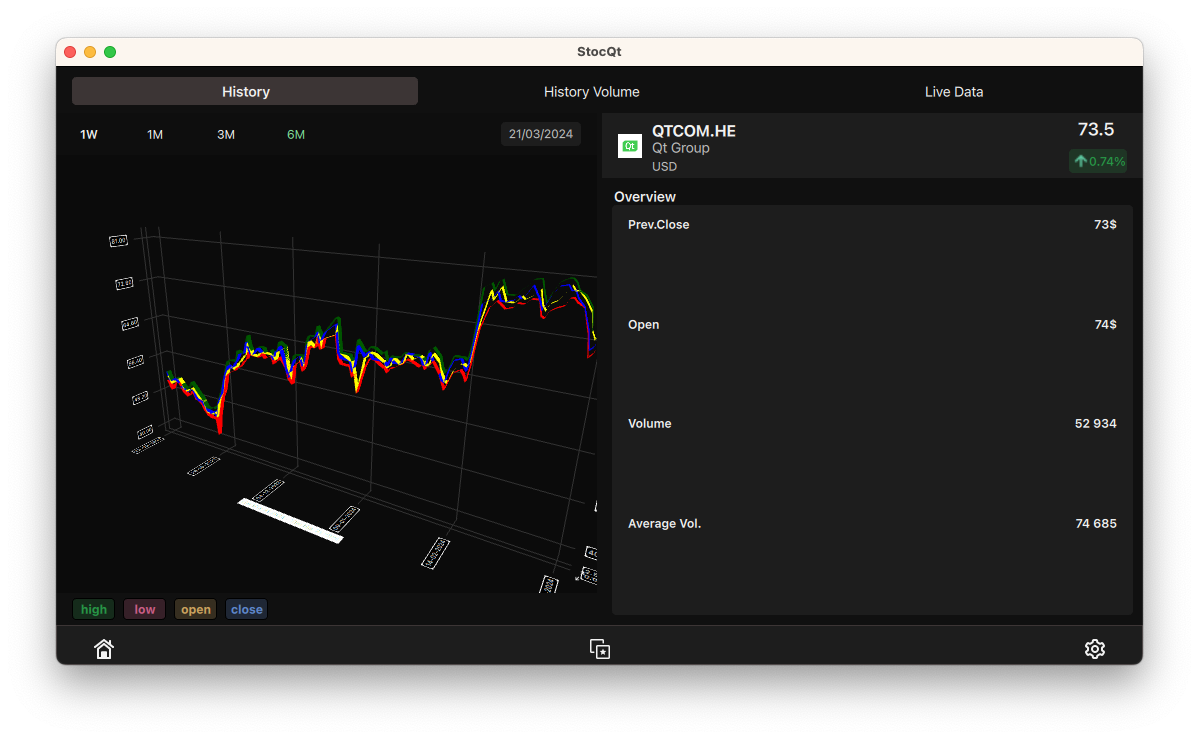
OSM Buildings, which uses Qt Quick 3D, Qt Positioning and Qt Network to create a 3D building map based on information from OpenStreetMap. In the example Virtual Assistant capabilities for working with 3D animation were demonstrated. In the example volumetric rendering shows how to use 3D textures in Qt Quick 3D for volumetric ray tracing. Completely redesigned example StocQtwhich uses Qt Graphs to display stock market data.

Additionally, you can note
publication integrated development environment Qt Creator 13.0, designed for creating cross-platform applications using the Qt library. It supports both the development of classic programs in C++ and the use of the QML language, in which JavaScript is used to define scripts, and the structure and parameters of interface elements are specified by CSS-like blocks. Ready-made assemblies formed for Linux, Windows and MacOS.
IN new version:
- Added offline and online installers for ARM systems with Linux.
- The Welcome to Qt Creator interface has been updated to include support for dark and light themes.

- Improved interface for moving panels used in debugging mode and creating widgets (Widget Designer). Added support for temporary collapsing for vertical panels. It is possible to freely move panels by their header without first undocking them.

- Added support for creating, deploying, running and debugging applications for devices that use Qt Application Manager (for applications based on Qt 6 and CMake).
- Added partial support for iOS 17.
- Changed the default build directory to use the “build” subdirectory in the project code. You can change the build directory using the “Preferences > Build & Run > Default Build Properties > Default build directory” setting.
- In project mode added “Vanished targets” section, which displays kits (links to different build tools and versions of Qt) that are no longer available, and the ability to create a replacement or use when building, deploying and running another existing kit is provided.
- Provided the ability to create kits for projects in Python (to select a different version of the interpreter).
- Added the ability to use LSP (Language Server Protocol) servers for YAML, JSON and Bash.
- The code editor provides support for navigating from QML components to their associated C++ code.
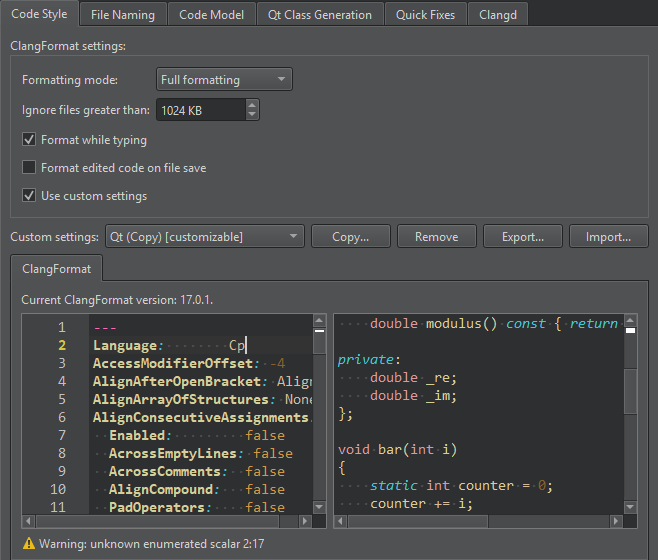
- Conducted reorganization of ClangFormat settings. A text editor with syntax checking is provided to change your own settings.


Thanks for reading: