Google Company published web browser release Chrome 126. Simultaneously available stable release of a free project Chromium, which serves as the basis of Chrome. Chrome browser is different from Chromium using Google logos, the presence of a system for sending notifications in case of a crash, modules for playing copy-protected video content (DRM), a system for automatically installing updates, constantly enabling Sandbox isolation, supplying keys to the Google API and transmitting RLZ parameters when searching. For those who need more time to update, the Extended Stable branch is separately supported, followed by 8 weeks. The next release of Chrome 127 is scheduled for July 23rd.
- The built-in PDF viewer integrates the ability to extract text from a document, called through the “Extract text from PDF” option in the context menu. A machine learning-based optical character recognition (OCR) engine is used to extract text from scanned documents in which text has been inserted as an image. It is expected that the new feature will make it easier for people who have vision problems and use screen readers to work with PDF documents. In the future, it is planned to implement text recognition on images displayed on pages and on screenshots. The OCR engine is enabled by default for 50% of users, and the rest can activate it through the “chrome://flags/#pdf-ocr” setting.
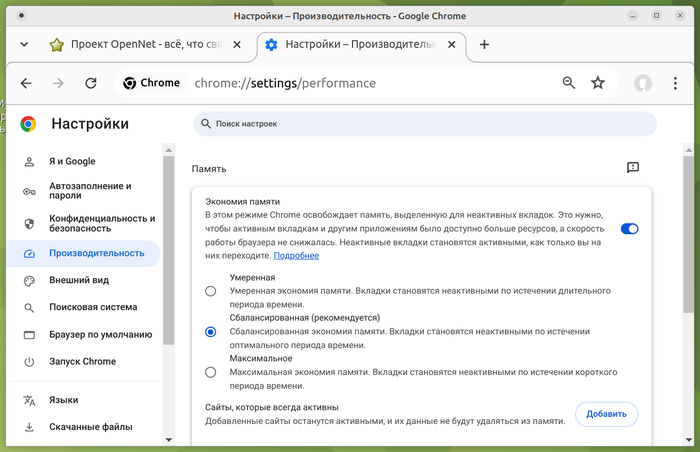
- On the configurator page with performance parameters (“Performance / Memory Saving” in the chrome://settings/performance section), the ability to configure the level of aggressiveness of using the Memory Saver mode has been added, which reduces RAM consumption by freeing up memory occupied by inactive tabs . For example, when choosing a moderate level, the browser will unload fewer tabs from memory than when setting it to maximum. The setting, which by default is available only to some users, can be activated through the parameter “chrome://flags/#memory-saver-aggressiveness”.
- For some users, the PDF viewer defaults to the new OOPIF (out-of-process iframe) architecture, where document content is processed in a separate process. The new architecture eliminates the complications inherent in engine-based implementations GuestView, and makes it easy to add new features to the PDF viewer. To enable the new architecture, you can use the “chrome://flags/#pdf-oopif” setting.
- Added Reactive prefetch mode, which loads resources associated with a page during navigation, without waiting for them to actually be requested, which allows you to speed up the opening of new pages. To predict resources that may be needed in the future, an external Google service is used, which returns a list of recommendations after sending it the URLs of the pages being navigated.
- Added the ability to search in the service Google Lens by any images and text visible on the screen. The feature is enabled through the context menu, an indicator in the address bar, or the “⋮” menu, after which the user can select an object of interest on the screen and obtain information about it from Google Lens. When performing an operation, a screenshot of the screen is sent to the Google server. The feature is currently activated by default for 1% of users. The “chrome://flags/#enable-lens-region-search-static-page” setting can be used to enable or disable Google Lens support.
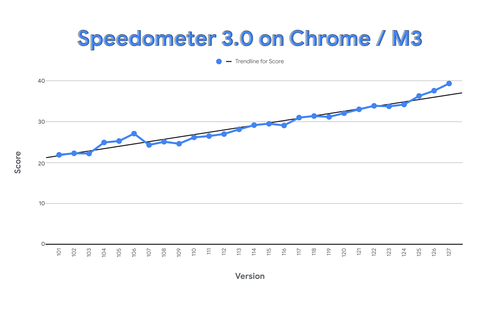
- The results have been summed up optimizations to speed up the Speedometer 3 test – Chrome's performance in this test has increased by 72% over two years. For example, the work of the SpaceSplitString function, used when parsing expressions like “class=”foo bar”” was accelerated, functions for working with memory were optimized, unnecessary operations when working with web form elements were removed and the most frequently used ones were accelerated, the use of innerHTML was optimized, rendering was accelerated fonts. Acceleration was also achieved thanks to the optimization of the garbage collector in the V8 engine, the efficiency of which was increased by activating garbage collection during the idle time of the rendering process, so as not to compete with the application for CPU resources.
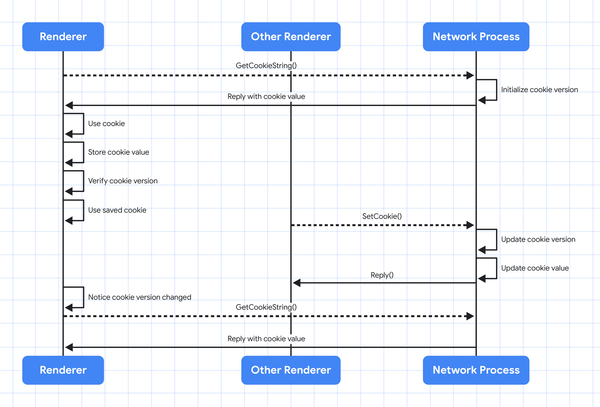
- Much increased efficiency working with Cookies, which made it possible to reduce delays when working with websites. Previously, each time a Cookie was accessed, a synchronous request was sent from the process processing the site to the process providing network interaction. Since web applications quite actively use values from Cookies, such requests between processes slowed down the work, despite the fact that 87% of external calls were redundant.
To solve the problem, a new architecture is used, in which each process contains its own copy of the Cookie data and accesses it directly, and changes in the Cookie, which, for example, can occur when working with the same Cookie in another tab, are tracked through a versioning mechanism. The network of this mechanism is that each document.cookie value is assigned a counter with a version number, which is stored in shared memory, incremented when the value changes, and checked against the existing instance when read.
- API View Transitionswhich makes it easier to create transitional animation effects between different DOM states (for example, a smooth transition from one image to another), default allowed to create effects of transition from one page to another within one site (same-origin). Previously, this API could only be used when changing states on the same page. To apply transition effects between different documents, use @-rule “view-transition” property “navigation: auto”.
- API Enabled CloseWatcher, which makes it possible to monitor Close requests in web applications and respond to their arrival (for example, you can create a handler for pressing the back button on an Android smartphone). Close requests are generated when trying to close modal (‹dialog›) and pop-up dialogs (popover=””) by pressing the Esc key, using the “Back” button or an on-screen gesture on smartphones.
- In API Gamepadwhich allows you to monitor and process events from gamepads and game controllers, added support for feedback mechanisms (trigger-rumble), for example, controller vibration.
- To interfaces GeolocationCoordinates And GeolocationPosition added .toJSON() method for serializing objects with coordinates in JSON format.
- The version for ChromeOS adds support for the tab display mode (CSS property “display: tabbed”), which includes the use of tabs, which, for example, can be used to organize the editing of several documents in one web application.
- Added experimental opportunity (origin trial) preview content received from a camera or microphone.
- The WebGPU API significantly accelerated shader compilation. In the backend for the Vulkan graphics API, data loading into the GPU is optimized (direct writing to the GPU buffer is provided without intermediate copying).
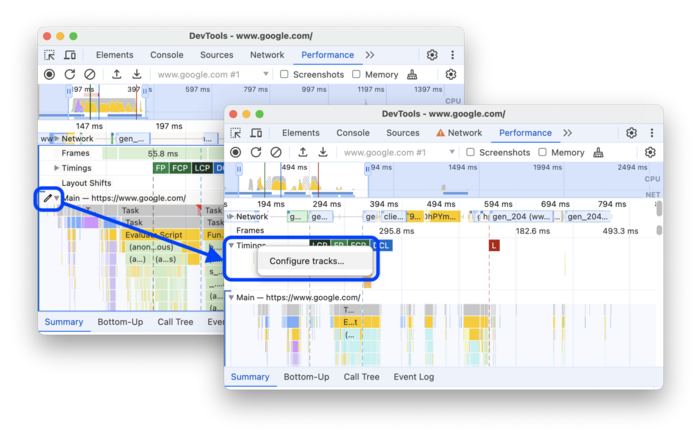
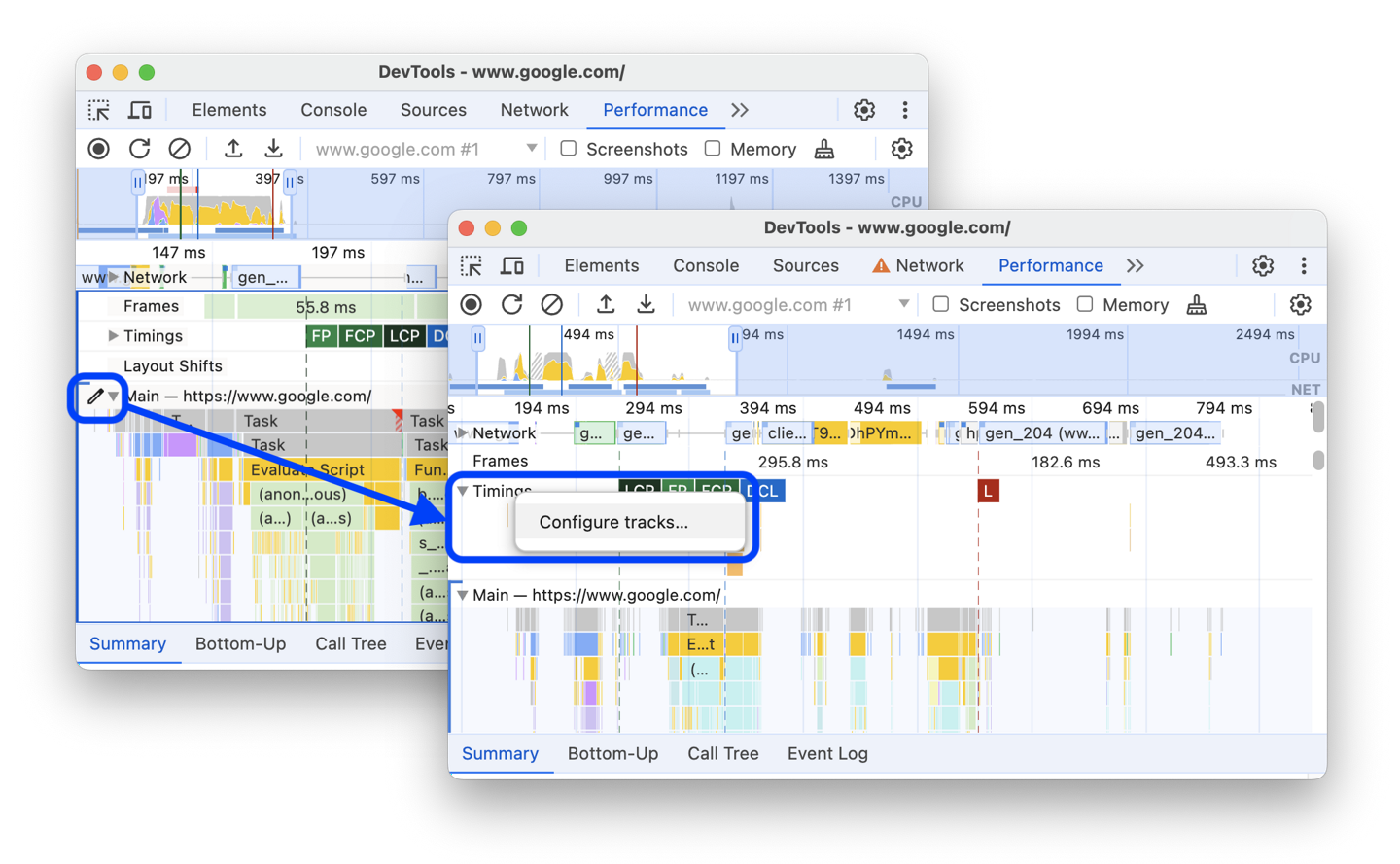
- Submitted improvements to tools for web developers. In the 'Application > Storage' section, the ability to inspect data saved using the Storage Buckets API has been added, which allows you to organize data storage by dividing the storage into separate segments associated with the IndexedDB and CacheStorage APIs. In the performance evaluation panel, the ability to move and hide tracks has been added, as well as excluding information about script execution from the performance graph and enabling a mode to artificially slow down system performance by 20 times.
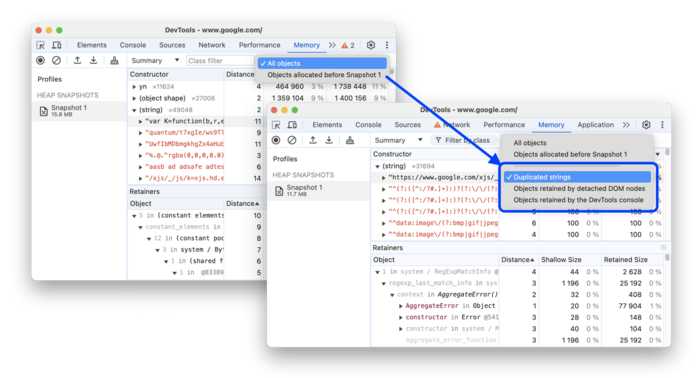
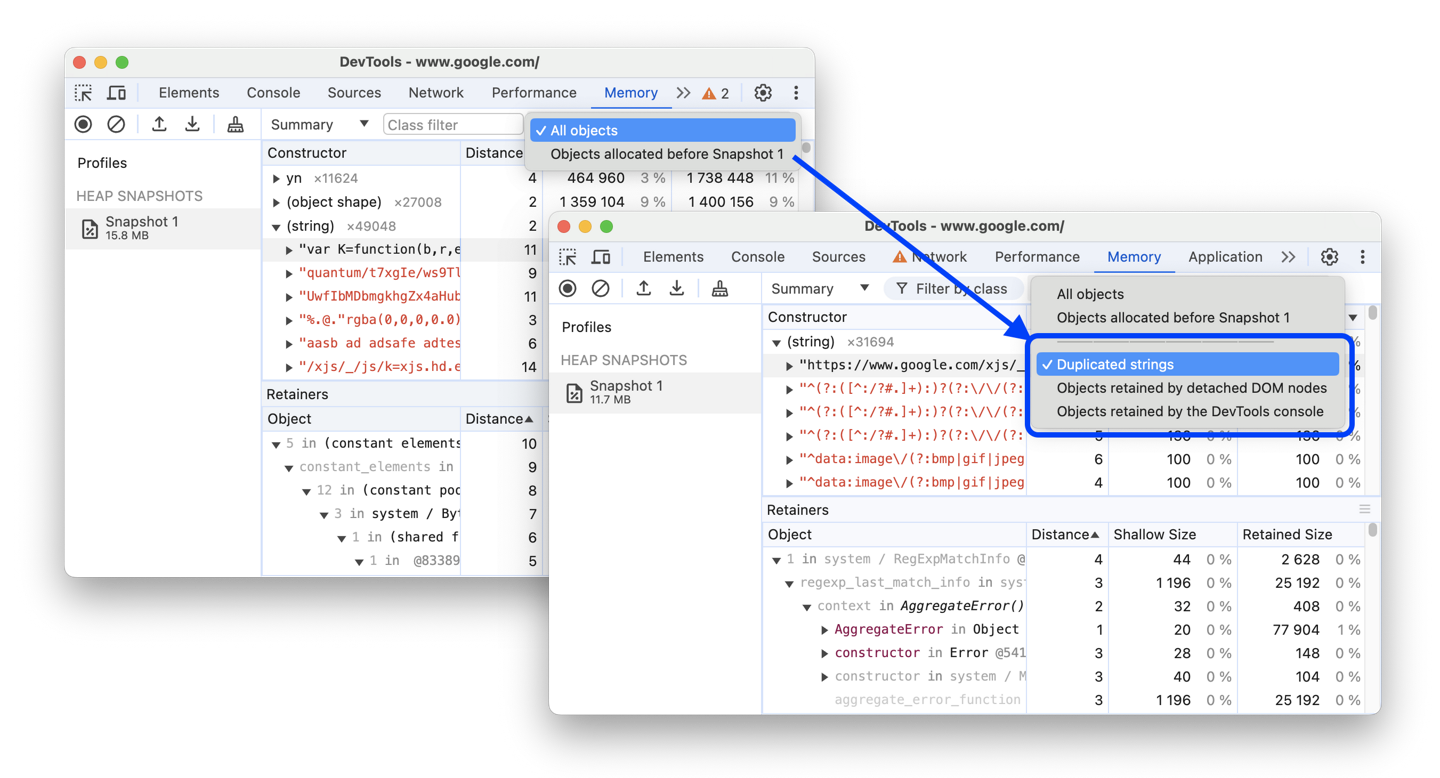
The network activity tracking panel provides support for substituting the full HTTP header string in the “name: value” format into the received response. Added filters to the memory consumption dashboard to identify memory inefficiencies, such as duplicate rows or leaving objects associated with detached DOM nodes.


In addition to innovations and bug fixes, the new version eliminates 21 vulnerabilities. Many of the vulnerabilities were identified as a result of automated testing with tools AddressSanitizer, MemorySanitizer, Control Flow Integrity, LibFuzzer And AFL. 9 issues are assigned a high level of severity. No critical problems have been identified that would allow one to bypass all levels of browser protection and execute code on the system outside the sandbox environment. As part of the program to pay cash rewards for discovering vulnerabilities for the current release, Google paid 11 awards worth more than $168 thousand.
For vulnerability CVE-2024-5839, associated with a problem in the implementation of the memory allocation mechanism, a record premium of $100,115 was paid. This vulnerability is rated as Moderate Severity and has the potential to cause heap memory corruption when processing specially formatted HTML content. In addition, one bonus was paid in the amounts of 25,000, 7,000, 3,000, 2,000, 1,000 and 500 dollars, as well as two awards in each of 10,000 and 5,000 dollars. The size of the 7 rewards has not yet been determined.
Thanks for reading: