We explain how to play with a controller PS5 on the PC version of Forza Motorsport. Indeed, like many games in the Microsoft catalog, Forza Motorsport does not automatically recognize PS5 controllers. However, there is a method to get around the problem and enjoy your races with the home controller. Sony.
Play with a PS5 controller on Forza Motorsport
If you are launching the game for the first time on PC, you will probably notice that your controller is not recognized. But don’t worry, via our solutions, the game will become compatible with your PS5 controller. On the other hand, this will not be fully supported by the game, in particular its haptic triggers. Forza Motorsport being a game designed for Xboxthe mapping will be presented in the form of a controller Xbox.
Use DS4Windows
Our solution is to use the software DS4 Windows. This allows you to add your PlayStation controller to your PC and therefore to all games where it is not recognized. Be careful though, because on games where your PS5 (or PS4) controller is already detected without the software, this will make the game believe that there are two PlayStation controllers connected. This will duplicate your actions, so it is recommended to disable DS4 Windows before launching these games.
For Forza Motorsport it’s quite complex. Indeed, even with the DS4Windows software installed, the game will be finicky and will not necessarily let you use your favorite controller. We have a tip that we suggest you follow point by point:
- Plug your controller into your computer.
- Launch DS4Windows (your controller should appear on the DS4Windows software).
- In the DS4Windows Controllers tab, select a new profile (the arrow next to Edit). Use a predefined configuration with “Game controller” and “Xbox 360” Output controller as preconfigurations. Apply, give this preset a name and save the profile.
- In DS4Windows settings, check “Hide DS4 controller”.
- Launch Forza Motorsport
- Press Alt+tab to return to DS4. Go to settings and uncheck “Hide DS4 controller”
- Alt+tab again to return to the game.
- Press Alt+tab again to return to DS4Windows and check “Hide DS4 controller” again.
- Finally, return to the game and your PS5 controller should work correctly.
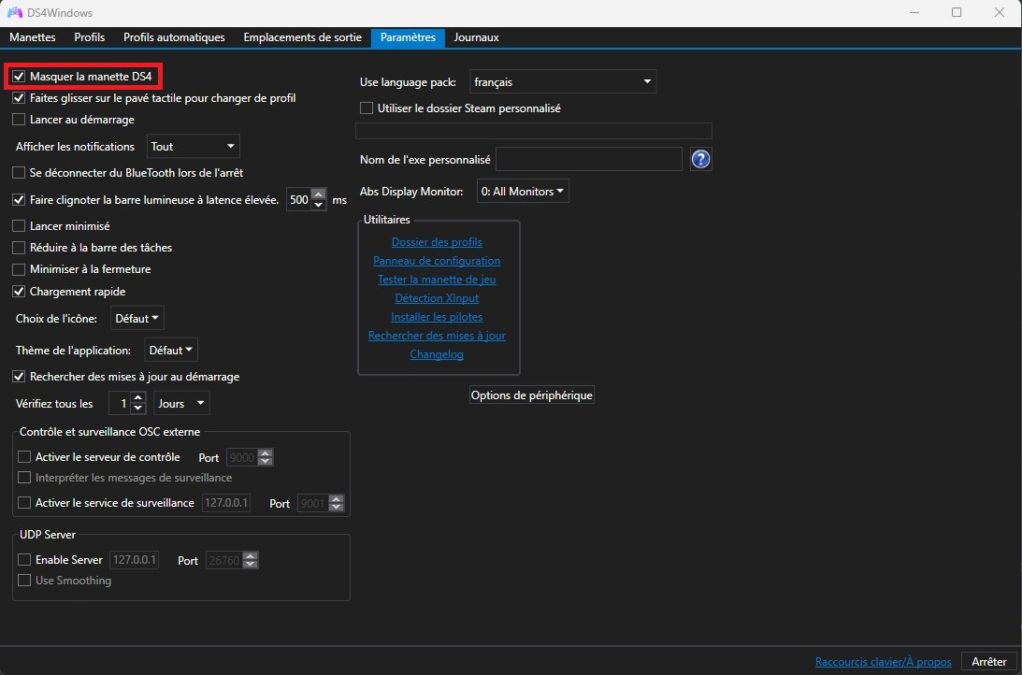
It is indeed a very tedious operation but this method allows you to play Forza Motorsport with a PS5 controller. You will have to repeat this operation each time you launch the game to be able to use the controller. Sony on the game.
You can find more guides and all the latest video game news on Gamosaurus.