Have you ever thought of bringing life to your simple photos? Creating a complete story with just image-to-video has become a reality with the power of AI. In fact, this revolutionary technology changes the still photos into stunning motion visuals that can have the depth, the flow, and even the emotion that traditional editing methods would not be able to.
Now with smart tools like Wondershare Filmora, anyone can bring their creative ideas to life. To make the animations more lifelike, the Veo3 model, which is the cutting-edge model, is used along with the Nano Banana model, which is there to enhance the image quality.
Let’s learn how it all works.
Part 1: The power of Image to video AI
Image-to-video AI is a future-like concept that is, in fact, already changing the way content creators work. Basically, the tech first finds the object in the image and then tries to work out how it would move if the video were real. The AI obtains the concepts of depth, texture, and perspective and, thus, alters those parts of a photo, such as the background, the light, or the movement of the subject, in order to produce a living video from your picture.
Behind the scenes, models like Veo3 work by breaking down the image into multiple layers, adding motion patterns, and applying cinematic camera dynamics. The result? A seamless video that looks hand-edited but isn’t.
It is applied in these different areas:
- Marketing & Ads: Companies quickly change a product image to a short video ad.
- Social Media Creators: Influencers grab attention with a quick reel or TikTok clip made from a photo.
- Memory Videos: Regular users make a clip of their travel or party photos with a nice story.
- Corporate Presentations: Firms get a brand story or a stylish intro done without any hassle.
Basically, photo-to-video AI helps people to tell their stories in a simple way, which is a great thing for those who have no skills or resources.
Part 2: How AI Video Generator from Image Speeds Up Your Content Creation
Traditional video editing often feels like running a marathon. At first, you operate multiple gadgets to import pictures, select transitions, add effects, sync music, and manually adjust everything. It is fulfilling, but it consumes a lot of your time.
What if you could skip the majority of those steps? That’s what AI video generators from images do. They automate the editing process by understanding your input and generating ready-to-use video sequences within minutes. And that’s where Wondershare Filmora stands out.
Why Filmora Makes It Easier
Filmora’s image-to-video AI is built to simplify content creation without sacrificing quality. By leveraging Veo3 for intelligent motion generation and Nano Banana for image enhancement, it can automatically:
- Animate backgrounds, adjust camera movement, and apply cinematic effects.
- Sync visuals with background music and rhythm patterns.
- Offer smart templates for social media, YouTube, and ads.
- Enhance image clarity before animation for sharper results.
In a few clicks, what used to take hours now happens in seconds.
Filmora vs. Traditional Editing
| Feature | Traditional Editing | Filmora’s AI Generator |
| Time Required | 2–4 hours per short video | 3–5 minutes |
| Skill Level | Intermediate to advanced | Beginner-friendly |
| Customization | Manual | Smart + Guided |
| Output Quality | Depends on the editor | Consistent, cinematic |
| Workflow | Complex & tool-heavy | Unified, automated |
This simplified method enables artists to keep their focus on the creative aspect instead of the technical side of things. If you are making content for branding, learning, or amusing people, Filmora will deliver you a shorter way to an excellent result. Therefore, whenever you have the thought, “I just have a picture, not a video,” consider that AI is capable of doing that transition without any effort.
Part 3: How to Use Filmora’s Image to Video AI Step-by-Step
You don’t need to be a professional editor to make magic with Filmora. Here’s how you can create your own AI-generated video from images in just a few steps:
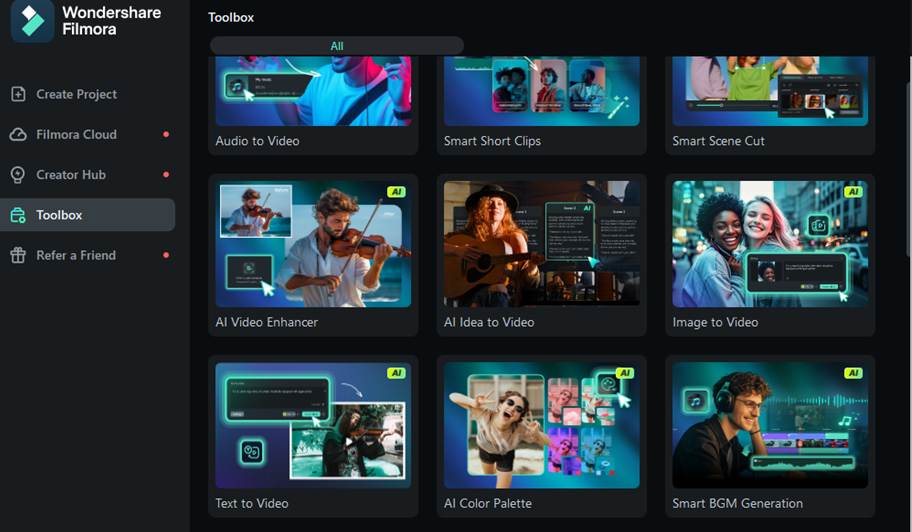
Step 1: Upload Photos
Open Filmora and navigate to the Image-to-Video AI feature. Upload your photos, either a single image or a collection you’d like to animate.
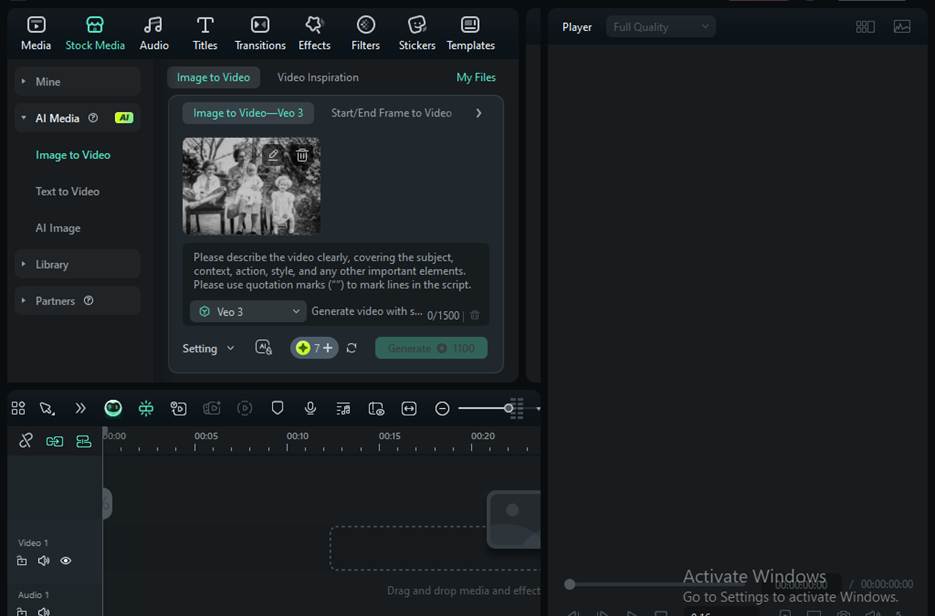
Step 2: Apply VEO 3
Once your photos are uploaded, describe your scene or idea in the prompt box. Then choose VEO 3, Filmora’s powerful motion generation model, which will automatically add lifelike transitions, depth, and smooth motion. Click Generate Video to preview the result.
Step 3: Explore Nano banana Model
Want to try something unique with images? So choose video inspiration and see versatile options go to Nano-B style, and see versatile Nano banana model templates. See how your images look in Nano banana style.
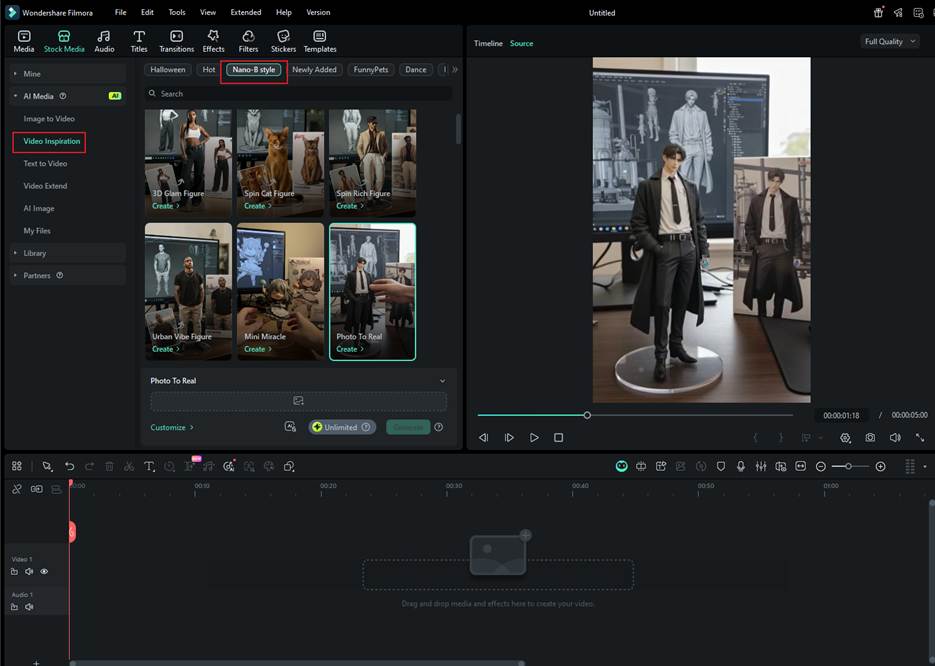
After you’ve received the video, you can personalize it by adding background music, captions, or voiceovers. Then, export your video in your preferred format, ready to share or cherish.
Pro Tips:
- If you want to create the best motion effects, then you should use high-resolution images.
- By using different lighting settings, you can create cinematic looks.
- Someone’s voice or captions are definitely helping to make the message that is being delivered more appealing.
- Use different AI-generated clips to narrate a story that is longer.
That’s it! No complicated editing or third-party plugins are necessary. Filmora does the difficult work while you remain creative.
Conclusion
Creativity is not being replaced by AI; rather, it is being amplified. Now with image-to-video AI, your non-moving photos can become moving stories that attract, delight, and convert. The use of this technology by any one of you—marketer, influencer, or simple hobbyist—brings forth new creative possibilities without any of the usual technical challenges being a barrier to you. Wondershare Filmora is the one that makes everything easy and within everyone’s reach. Its image-to-video AI feature, which is powered by the Veo3 model and is upgraded by the Nano Banana model, is the one that takes your dreams and makes them into real-life visuals that are ready for production in just a few minutes.
Why not start your next video today and find out how AI-powered editing can make your storytelling so simple?