A zero-day vulnerability that could be used to bypass security warnings and automatically run Python scripts has been fixed in the Telegram desktop application for Windows.
Edition Bleeping Computer reports that last week rumors appeared on social networks and on hacker forums about a certain vulnerability in Telegram that allows arbitrary code to be executed on the victim’s machine.
While some claimed it was a vulnerability that required no user interaction at all, videos demonstrating the issue showed someone clicking on a received file in Telegram to launch a calculator on Windows.
At that time, Telegram representatives promptly refuted rumors about the vulnerability, stating that they “cannot confirm the existence of such an issue” and the video is most likely fake.
However, shortly after this, a POC exploit was published on the XSS hacker forum, which explained that due to a typo in the source code of Telegram for Windows, it was possible to send Python .pyzw files to users, which, when clicked, could bypass the warnings.
As a result, the .pyzw file was automatically executed, and Telegram did not show any warnings, as happens with other executable files and should have happened in this case. Under normal circumstances, when running a file with a potentially dangerous extension (a list can be found Here), the messenger displays a warning saying that the file may harm the user's computer.
However, files of unknown types that users share via Telegram can run automatically on Windows, allowing the OS to decide which program to use to run them.
Even worse, the XSS exploit disguised a Python file as a preview video, a tactic that could be used to trick users into clicking on a fake video.
In a conversation with Bleeping Computer, the developers noted that they had already fixed the problem in Telegram, and now the automatic launch of Python scripts when clicking on a file does not work. The company also once again emphasized that this was not a zero-click vulnerability, that is, the problem still required human interaction.
“Rumors about the existence of a zero-click vulnerability in Telegram Desktop are not true. Some “experts” recommended “turning off automatic downloads” in Telegram, but there were no problems that automatic downloads could cause.
However, an issue was discovered in Telegram Desktop that required the user to click on a malicious file when the Python interpreter was installed on the computer. Contrary to previous reports, this is not a zero-click vulnerability and may only have affected a small portion of our user base: less than 0.01% of our users have Python installed and are using the corresponding desktop version of Telegram.
We have applied a server-side fix to ensure that even this issue is no longer reproduced, so all versions of Telegram Desktop (including older ones) no longer have this vulnerability,” the company said.
As Bleeping Computer explains, the developers were of course aware that .pyzw files intended for Python zipapps could pose a threat. However, the extension list mentioned above included the .pywz extension rather than .pyzw. That is, the problem was a banal typo.

Journalists note that the developers were notified of the error on April 10, and they fixed it by correcting a typo in the file data_document_resolver.cpp. However, this fix does not work yet and the warning is still not shown after clicking on the file.
Instead, the Telegram authors have solved the problem on the server side for now by adding the .untrusted extension to all .pyzw files. That is, when you click on them, Windows will ask the person what program to use and will not automatically launch them through Python.
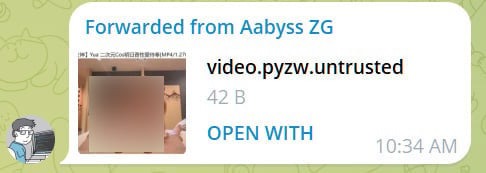
In future versions of the Telegram desktop app, the usual warnings about potentially dangerous files should be introduced, and the need for .untrusted extensions will no longer be required.