If you are using Firefox Nightly, I have 129.0a1 here, you can try out the vertical tabs. They are still hidden, but can already be activated. We reported in May that vertical tabs and tab grouping were coming.
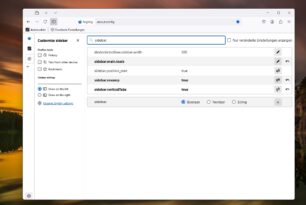
Users have been wanting this feature for a while and have been able to use an add-on to do so. But now it is being integrated natively into the browser. Until it is officially available in the settings, you have to make these settings via about:config.
- In the address bar about:config enter, call and confirm the hint
- In the search then sidebar.revamp set the switch to True
- sidebar.verticalTabs also on True
- Then restart Firefox
At the top you have a switch with which you can fold the tabs to the side. If not, right-click at the top and drag the button in via “Customize toolbar”. At the bottom you also have the gear wheel for the sidebar settings, whether the tabs should appear on the left or right. As well as the history, tabs from the other device and the favorites.
Let's see what else Mozilla can do here. PS: Firefox 127.0.2 has just been officially released.