Since Windows Vista / Windows 7, File Explorer offers different views that are set up for the folders. You can display images as a thumbnail preview or small icons and other files as a list or detail.
There was already a trick in the registry to use only one setting for all folders. But this trick has another advantage that has now come to light again. Because of this change, the contents of the folders are displayed more quickly, even if there are many files there. Because this tells Windows not to check how the content should be displayed. This speeds up the view, even if you use an SSD (NVMe) as a storage medium.
But as I said, this only has an advantage if you are working with a lot of files. You can try it out. If you want to undo it, simply delete the NotSpecified value again. And that is how it works.
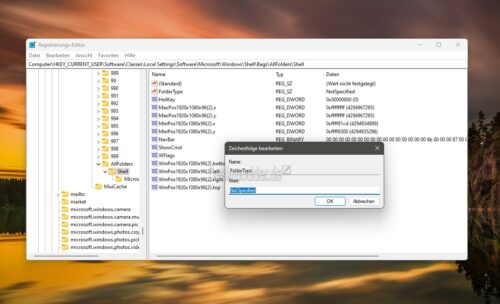
*Press Windows key + R, enter regedit, start and go to this path
HKEY_CURRENT_USERSoftwareClassesLocal SettingsSoftwareMicrosoftWindowsShellBagsAllFoldersShell
*Double click on FolderType and enter NotSpecified as the value and save.
Here is the template:
Windows Registry Editor Version 5.00
[HKEY_CURRENT_USERSoftwareClassesLocal SettingsSoftwareMicrosoftWindowsShellBagsAllFoldersShell]
"FolderType"="NotSpecified"