AVM has today provided another FRITZ! Lab. The FRITZ!Box 7590 AX, 7590 and 7530 AX will be updated with the first lab update this weekend, as will the cable models 6690, 6660 and 6591. Numerous improvements have been integrated. New in this version is the online monitor. This now shows more precise data on the utilization of the home network. In addition, the display for the average utilization of the radio channel has been refined in the “WLAN” -> “Radio channel” area.
Online Monitor
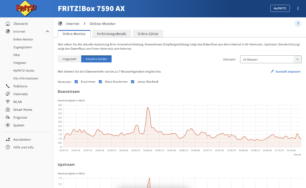
Online Monitor
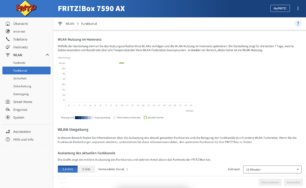
Radio network
Further improvements within the laboratory (7590 AX, 7590 and 5590):
- NEW New graphical online monitor with extended information on the utilization of the Internet connection by individual network devices
- Fixed The button to extend the online time in the details of a network device was not displayed when the standard profile was restricted
- Fixed Link on WAN pointed to an unreachable page (Error 404)
- Fixed Settings for fixed WLAN channel in the 2.4 GHz band may not have been adopted
- Fixed Older FRITZ!Repeater models were displayed with the wrong icon under “Mesh” in the user interface
Further improvements within the laboratory (6690, 6660 and 6591):
- NEW New graphical online monitor with extended information on the utilization of the Internet connection by individual network devices
- NEW Visualization of WLAN usage in the home network for the last 7 days added to “WLAN > Radio channel”
- NEW The temperature that can be set for radiator controls can be limited with a lowest and highest temperature
- improvement Note on a possible risk when port sharing for port 80 or 443 added
- Fixed When making certain changes to an IPSec or WireGuard® connection, an error message with error code 1 appeared
- Fixed The button to extend the online time in the details of a network device was not displayed when the standard profile was restricted
- Fixed Link on WAN pointed to an unreachable page (Error 404)
- Fixed Settings for fixed WLAN channel in the 2.4 GHz band may not have been adopted
- Fixed In the FRITZ!Box user interface, the button for 5 GHz in the WLAN device details was not functional
- Fixed Older FRITZ!Repeater models were displayed with the wrong icon in the user interface in the Mesh
- Fixed If the standard profile was locked in parental controls, the FRITZ!Box was incorrectly displayed as locked
- Fixed The online help button was missing
- Fixed In some cases, the user interface incorrectly displayed the LAN ports used by network devices
- Fixed After reordering the network connections display, the view jumped back after a few seconds
- Fixed Smart home devices could not be accessed from the table on the “Home Network > Mesh > Mesh Overview” page
- improvement Uniform naming of the “Mesh Overview” page in the user interface when a FRITZ!Box is used as a Mesh Repeater
The updates at a glance:
- FRITZ!Box 7590 AX (7.90-113463)
- FRITZ!Box 7590 (7.90-113459)
- FRITZ!Box 7530 AX (7.90-113462) – new
- FRITZ!Box 5590 (7.90- 113465)
- FRITZ!Box 6690 (7.90-113464)
- FRITZ!Box 6660 (7.90-113461)
- FRITZ!Box 6591 (7.90-113460)
The update can now be downloaded via the user interface. All others can find here a link to take part in the lab as soon as AVM has updated this page accordingly. This page provides an overview of current FRITZ!Boxes and their update status.