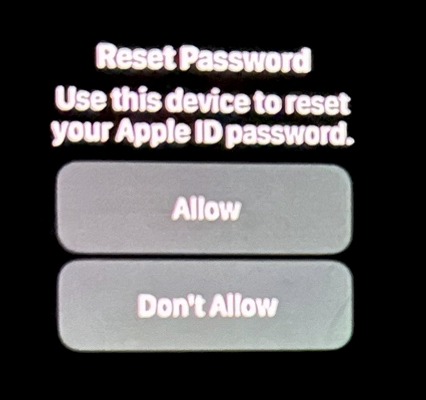
Apple device users are complaining about a new type of phishing attack related to the password reset feature. Thus, victims’ devices receive dozens or even hundreds of password change requests, and until the victim carefully closes all these notifications by clicking on the “Allow” or “Don’t Allow” buttons, it is almost impossible for the device to use.
Cybersecurity journalist Brian Krebs was one of the first to draw attention to what was happening on his blog KrebsOnSecurity. According to him, attackers count on the fact that by closing many identical windows, the user will sooner or later make a mistake and press the wrong button.
If this does not happen, scammers call the victim, posing as Apple support, and report that the account is under attack, so the support service urgently needs to verify the one-time code received on the device.
One of the victims was Parth Patel, an entrepreneur who is working on a cryptocurrency startup. Last weekend Patel described in X phishing attack, of which he became a victim.
These types of attacks are commonly referred to as push bombing or MFA (Multi-Factor Authentication) fatigue. Their essence lies in the fact that phishers abuse the functionality or some bug in the multi-factor authentication system, literally flooding the victim’s device (or devices) with endless messages about changing the password or login.
“All my devices just exploded: my watch, my laptop and my phone,” Patel told KrebsOnSecurity. — It was like a system notification from Apple asking me to approve (account password reset) and I couldn't use my phone. I had to review and manually dismiss 100-plus notifications.”
Krebs notes that when victims of such an attack, some people end up clicking the “Allow” button just to be able to use their phone again. Other people may accidentally approve the password change, because messages will even appear on the user's Apple Watch, if he has the gadget.
However, the attackers behind this attack did not limit themselves to push bombing alone. According to Patel, after he rejected all offers to reset his password, his iPhone received a call from fake Apple support. At the same time, the number 1-800-275-2273 was displayed on the screen, that is, the telephone number of the company’s real support service.
“I picked up the phone and became very suspicious,” Patel says. “I asked if they could provide information about me, and I heard the person on the other end of the line typing aggressively, and then he told me all the information about me, and it turned out to be absolutely accurate.”
Everything turned out to be correct except Patel's real name. According to the victim, when he asked the fake customer service representative to confirm the name on his Apple account, he said the name Anthony, which Patel found only in biographies about himself sold on PeopleDataLabs, a site designed to search for data on people.
According to Patel, he went to great lengths to remove information about himself from several such sites and discovered that for some reason PeopleDataLabs kept listing the wrong name on his profile.
Patel says the phishers' goal is to obtain the user's Apple ID reset code, which is a text message containing a one-time password. If the user gives this one-time code to the scammer, he has the opportunity to reset the password for the account and block the real user. In addition, criminals will be able to remotely wipe all Apple devices belonging to the victim.
Another victim was Chris, the owner of a cryptocurrency hedge fund, who did not want to reveal his last name. Chris told KrebsOnSecurity that he encountered an almost identical phishing attempt in late February.
“In the first notification I received, I clicked “Don’t allow,” but immediately after that I received about 30 more of the same notifications,” Chris said. “I thought I might have gotten on my phone or accidentally pressed some button that caused these notifications to appear, so I just dismissed them all.”
However, the attackers continued to bombard Chris' devices with notifications for several days. And then he also received a call from fake Apple support.
“I said I would call them back and hung up. I then called real Apple support back, but they couldn't determine if someone from support had called me. They simply said that Apple would never initiate outbound calls to customers unless the customer specifically asked to be contacted,” Chris says.
Fearing that someone was trying to hack him and steal his entire digital life, Chris changed all his passwords and then went to the Apple store and bought a new iPhone. He then created a new Apple iCloud account using a completely new email address. However, after this, Chris only received a new barrage of notifications that had already arrived on the new iPhone and iCloud account.
According to the victim, the only thing that has not changed in his Apple profile is his phone number. That is, attackers somehow abuse the generation of system alerts from Apple, for which they need to know the victim’s phone number.
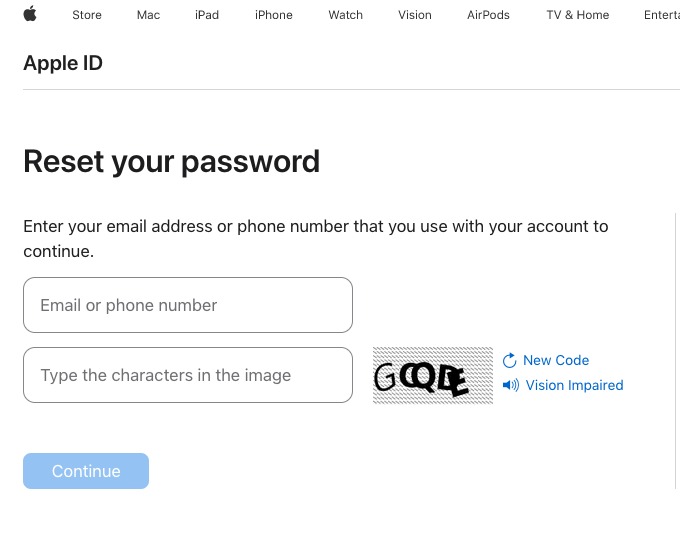
Brian Krebs notes that when you visit the page, you must enter your email address and solve a CAPTCHA. After this, the page will display the last two digits of the phone number associated with your Apple account. If you fill in the missing numbers and click the “Submit” button, a system notification will be sent to the user.
Since no authentication system would send dozens of password change requests to a user in a row, Krebs suggests that attackers could be exploiting some kind of bug in Apple's systems. However, Apple representatives did not respond to requests for comment.