The graphics feature VRR (Variable Refresh Rate) is also available on the PlayStation 5. Here we explain everything you need to know about VRR and how to activate it on your PS5.
What is VRR and what does it do?
VRR stands for Variable Refresh Rate. It should by optimizing the frame rate, or FPS (frames per second), for a better picture on your monitor/TV. At the same time, VRR is intended to prevent screen tearing and reduce lag. If VRR is activated, the connected screen outputs new frames to match the GPU’s image output.
In addition, that should Feature additionally the input lag, i.e. the delay time between pressing a button and the action carried out on your screen, reduce. Overall, the function is intended to improve the graphics performance of your console.
Enable VRR on PS5
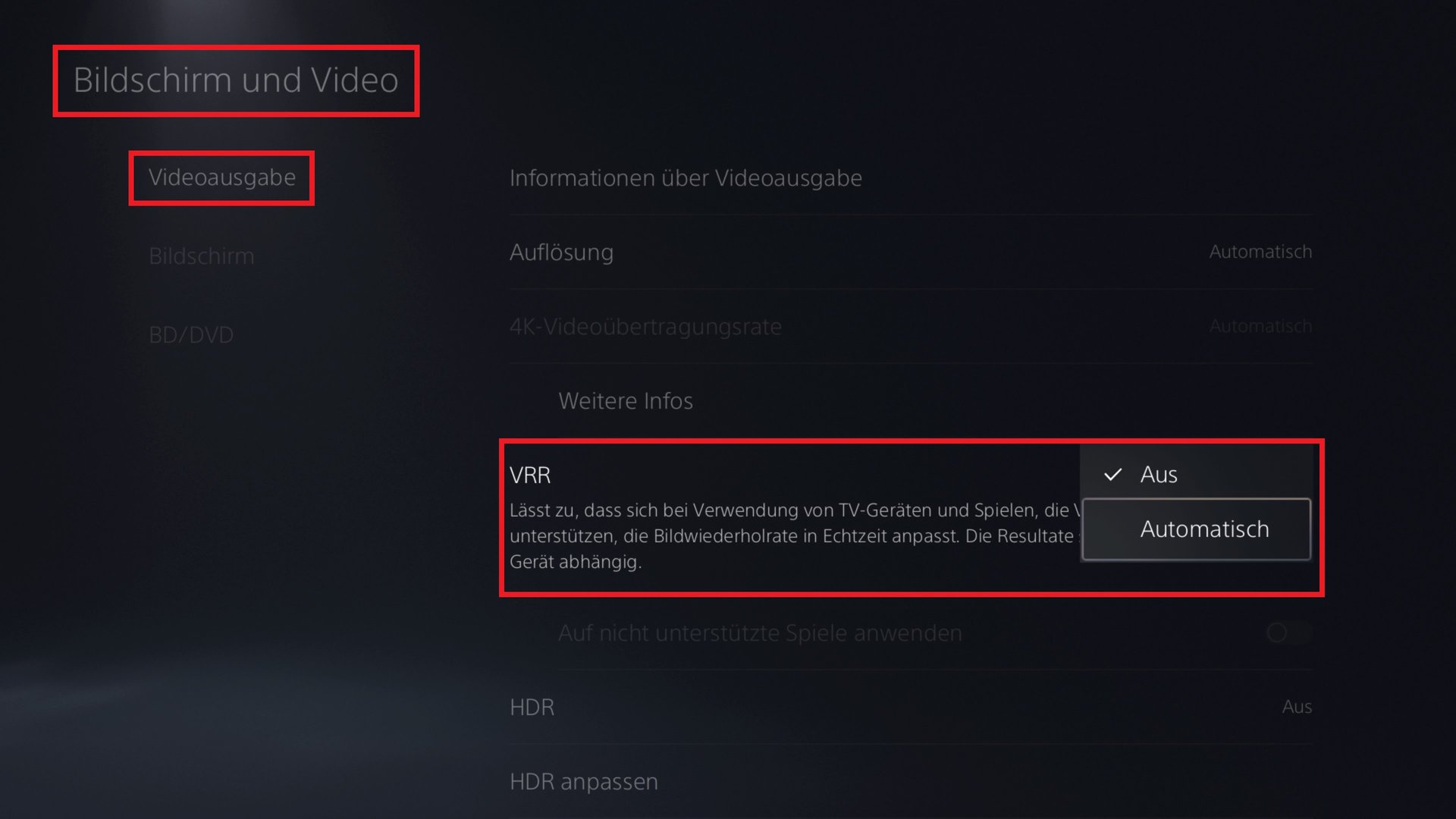
If you have the VRR feature on your PS5 If you want to activate it, proceed as follows:
- Goes into the “Settings” (gear at top right).
- Chooses “Screen and Video” out of.
- Next up “Video Output”.
- You can there Activate VRR, it switches from “Off” to “Automatic”. If your device does not support HDMI 2.1 or perhaps the cable is in the wrong slot, you cannot activate the feature. However, if you can activate it, you can choose under “Apply to unsupported games” whether you want to force the function on unpatched games or not (more on that below).
Requirements and limitations for VRR
Important note: In order to use VRR, you must have a monitor or television with an HDMI 2.1 slot. You cannot use VRR on devices with an HDMI 2.0 connection! By the way, the cable supplied with your PS5 console is an HDMI 2.1 cable, so you don’t have to worry about that. You can find out whether your television/monitor has a slot for HDMI 2.1 in the specifications of your model.
However, if you have the requirements listed above, it’s only half the battle, because it’s yours Each game should also support the VRR feature. These include the exclusive games Marvel’s Spider-Man: Miles Morales (including Marvel’s Spider-Man Remastered), Ratchet & Clank: Rift Apart and Astro’s Playroom. So it’s best to check in advance whether your PS5 game really supports VRR.
» Watch video: TECHfacts: FPS vs refresh rate

Digital Foundry Incidentally, the VRR feature was tested. One criticism of the test is that VRR on the PS5 only works in a limited frame rate range.
If the game’s FPS drops below 48 FPS, the feature will fail. Games with specific patches like Ratchet & Clank: Rift Apart run smoothly, but games without the respective patch still suffer from some problems. Also, VRR does not support PS4 games.