For several months, Microsoft has been working on making the start menu in Windows 11 more flexible. More flexible because they are trying to integrate a new sorting system under All Apps. We reported on this in April. The widgets were then added in May.
One function has already been integrated into Windows 11 23H2: pinning icons from the start menu directly to the taskbar. The current beta adds another change that Microsoft is currently testing.
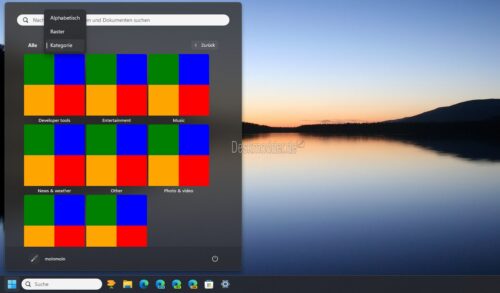
In the start menu under All Apps, a selection is added as to how you want to display the apps and programs. You can choose between Alphabetical (as it is now), Grid (several alphabetically next to each other) and new Category.
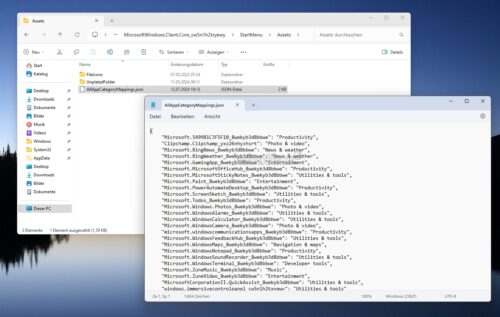
Here, the apps and programs are divided into individual categories. For this purpose, C:WindowsSystemAppsMicrosoftWindows.Client.Core_cw5n1h2txyewyStartMenuAssets added an AllAppCategoryMappings.json that categorizes the Windows apps accordingly. I could imagine that apps that you download from the store yourself are then sorted into the start menu from the store categories (photo, productivity, news, etc.).
- Download and unpack ViVeTool
- Then right-click in the folder and start the terminal while holding down Ctrl and Shift (this will start it as administrator)
- The command .vivetool /enable /id:47205210,49221331,48433719 enter and press Enter
Now restart.
Another change that Microsoft is currently testing is in the taskbar. Microsoft is currently testing the ability to display the context menu in the taskbar not only when right-clicking, but also when hovering over it.
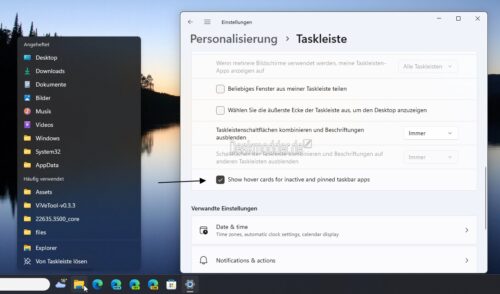
It's the same as with widgets if you don't deactivate it there. But I have to admit, I deactivated it immediately for widgets because it was and still is annoying when you hover your mouse over the taskbar and the news appears straight away. It's probably similar with the taskbar icons. But hey, there are definitely some people who might like it. And that's why there's a setting for that.