Over time, the PowerToys have received a variety of modules developed by the community. The advantage of this is that you only have to activate the ones you really need for your daily workflow.
A new module is currently being developed, called New+. It sounds unspectacular, but it isn't. This module adds a new entry to the context menu, which you can then integrate with personalized templates. This means that scripts, workbooks, and Excel files that you often have to work with can be linked to the context menu. This saves a lot of time when accessing the data.
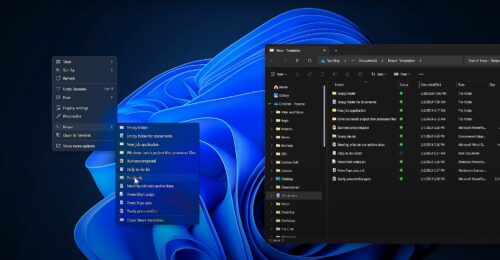
The project is still in its early stages. At the end of May, however, an entry was added to PowerToys that not only allows you to change the storage location, but also hides the file extensions so that only the file names are displayed. So anyone who has to work with files a lot could save themselves a lot of clicks to access these files.
As you can see in the picture, these workbooks and scripts can also be stored on OneDrive and thus edited by several people, for example. Replacing the individual entries is relatively easy, as the folder for the “templates” can be opened and edited in the context menu.
The location of the file itself is saved in a *.json file. But that's just a side note. A really interesting project for the PowerToys by Christian Gaarden. Here is another short video that was recorded in mid-May
We are currently using PowerToys 0.82.0, which was released just four days ago.