Opera has introduced version 113 today. This is Opera One R2, a further development of the previous browser. Currently available as a developer version. It includes improved multimedia, AI of course and improved tab management. And now also the split-screen function.
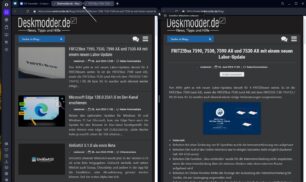
Sometimes it is useful to split a window. To compare PDFs or websites, new and old (archive.org). And Opera has now integrated exactly this function. You simply drag a tab to the right side of the browser and you can then open this tab as a split window. Both tabs are then shown as connected at the top. A click between the tabs (3 dots) is enough to leave this mode.
The revised Opera offers even more improvements, such as a new multi-media player including multimedia management. In the near future, Opera will also integrate themes. Then animated background images can also be used and more.
Arla, the AI function, has also been improved. “With Opera One R2, you get new Aria features like image generation and speech to text…Plus, Aria can read the answers out loud, which is a great feature for accessibility and multitasking…You can also perform queries using images as supporting information with Aria's image understanding features.”
You can read the complete article from Opera here read through at your leisure.