Microsoft Edge has its own screenshot function, which can be activated in Settings -> Appearance. In the new Edge 128.0.2629.0, Microsoft is now testing an advanced function for creating screenshots.
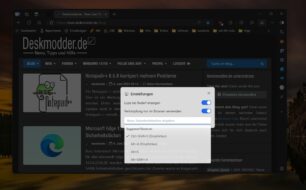
This new function is currently still integrated as a test. But it allows you to, for example, deactivate or activate the magnifying glass function in the settings. Or to assign the key combination Shift + Ctrl + S to another key combination. There is also a switch for this so that it can be used in the browser or outside of it. It just doesn't work here in my tests.
The advantage over the previous screenshot function is that you can also capture the area outside the browser. This is currently not possible in the stable version.
If you have Edge Canary installed, you can definitely try it out. Create a shortcut from Canary and right-click -> Properties tab Shortcut under Target, look for “…msedge.exe” Space and--enable-features=msEdgeScreenshotInWebCapture,msEdgeWebCaptureUniformExperience If you now start Edge via the shortcut, you can test the new function.
We'll have to wait and see whether Microsoft will incorporate this function later. Lots of things are tried and rejected. But these changes are very practical.