Microsoft had already presented the Copilot+ PC functions yesterday. Today it is the turn of the developers, for whom a lot has been changed and improved in Windows 11 24H2. A really long post was published about this today.
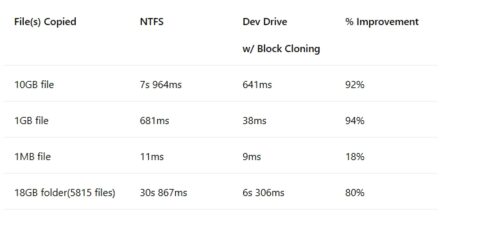
This is how WSL 2 is reported and also about Dev Drive. Because this is where block cloning is introduced. This makes it possible to copy large files immediately. “With the release of Windows 11 24H2, development workflows on a Dev Drive will become even faster. The Windows copy engine now features file system block cloning, resulting in near-instant copy operations and dramatically improving performance, especially in developer scenarios where large files are being copied.”
But something interesting was also reported about File Explorer. The new source code integration made it possible to track commit messages and file status directly in the file explorer. “File Explorer gives developers even more options with version control protocol integration (including Git). This allows developers to track data such as file status, commit messages and current branch directly in File Explorer.”
As Microsoft writes, the Microsoft Copilot stack will be expanded to Windows with Windows Copilot Runtime. This means that AI will be integrated into Windows at every level of Windows…“including a fundamental redesign of the operating system itself to give developers the ability to accelerate AI development on Windows.”
“Windows Copilot Runtime includes the Windows Copilot Library, a set of APIs supported by the more than 40 on-device AI models that ship with Windows. It also includes AI frameworks and toolchains to help developers integrate their own on-device models into Windows. This is built on top of powerful client chips, including GPUs and NPUs.”