We had to wait over two weeks for a new insider build in the Canary channel. Since there were problems, Microsoft decided not to publish them. But it's better this way than if there are a lot of negative reports afterwards.
So today we make a jump from 20 and end up with Windows 11 26040.1000, more precisely the 10.0.26040.1000 rs_prerelease. It was compiled on January 22nd, 2024. Fresh off the press, so to speak. We have linked the SDK and the other ISOs in the server article. Even if there is an ISO for this version, we will collect ISOs for this Canary and then put the link here. But now to the new Canary.
- We're starting to phase out a new feature for Windows that will allow you to effortlessly access and edit your latest photos and screenshots from your Android mobile device in the Snipping Tool on your PC. With this feature, you will receive instant notifications on your PC when a new photo or screenshot is taken on your Android device. (Settings > Bluetooth & devices > Mobile devices)
- We're expanding Voice Clarity, already available on Surface devices, and making it accessible to even more people. Voice Clarity is a feature that improves your sound experience on Windows with cutting-edge AI technology. Using low-complexity AI models, Voice Clarity suppresses echoes, suppresses background noise, and reduces reverberation in real time. This feature is enabled by default and can be used by applications that use communication signal processing mode, such as: B. Phone Link and WhatsApp. No additional hardware is required as Voice Clarity is supported on x64 and Arm64 CPUs.
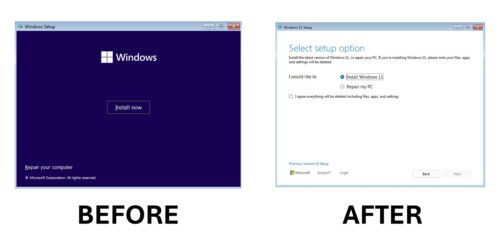
- We're updating the Windows OS Media Setup with a much cleaner and more modern design. All features continue to be supported in the bare metal installation of the operating system (including unattended support), but are now consistent with current upgrade and installation features for devices already running Windows.
- We are pleased to announce support for the latest generation USB standard, USB 80Gbps, in this build of Windows. USB 80Gbps support will initially be available on select devices with Intel Core 14th Gen HX series mobile processors, such as: B. the new Razer Blade 18.
- Improved visual enjoyment in the voice output
We are improving image consumption in speech output. There are two main changes:- We've introduced a new keyboard shortcut for navigating between the images/graphics on a screen/page. You can now use the “G” or “Shift + G” keys to navigate forward or backward between images in scan mode (voice + spacebar).
- Recognition of text in images, including handwriting, has been improved, as have general image descriptions. You can try out the improved feature by navigating to the image and pressing Narrator + CTRL + D when the focus is on an image. This feature requires an active internet connection and the setting to get image descriptions must be enabled in Narrator settings.
- Improved discoverability of Screen Casting in Windows 11 – Using your Windows PC's casting feature, you can wirelessly cast your screen to another PC, TV, or other external display nearby. We're introducing improvements focused on educating users about the Cast feature and improving its discoverability in Windows 11.
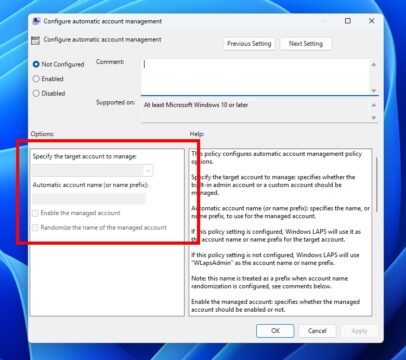
- Windows LAPS: New automatic account management feature – Windows Local Administrator Password Solution (LAPS) has been expanded with a new automatic account management feature. With this feature, IT administrators can now configure Windows LAPS to automatically create the managed local account. You can also configure the account name, enable or disable the account, and optionally randomize the account name to improve security. Improved integration with existing Microsoft local account management policies has also been added.
Known problems in Windows 11 26040
- [WICHTIGER HINWEIS FÜR SPIELER – AKTUALISIERT!] Some popular games may not work correctly and cause a bug check (green screen) when launched with the latest Insider Preview builds in the Canary Channel. Please make sure to provide feedback in the Feedback Hub about any issues you experience while playing games with these builds.
- New In some multi-monitor configurations on build 26040, a display may appear frozen. If this is the case, you can try using CTRL + WIN + Shift + B to restart DWM.
- [NEU] Content in some video streaming apps from the Microsoft Store may not play. As a workaround, try streaming via a browser.
- We are investigating an issue where the print queue displays a message saying the app cannot be found when opened. As a workaround, you can start the print queue from the Run dialog box (WIN + R) and enter the following:
explorer.exe shell:appsFolderMicrosoft.Windows.PrintQueueActionCenter_cw5n1h2txyewy!App. - Widgets The keyboard navigation from the bottom settings pages back to the top settings page is broken.